 Data 360 Inspector
Features · Segments and activation
Activations
Attributes, contact points, filters, and segment against activation counts.
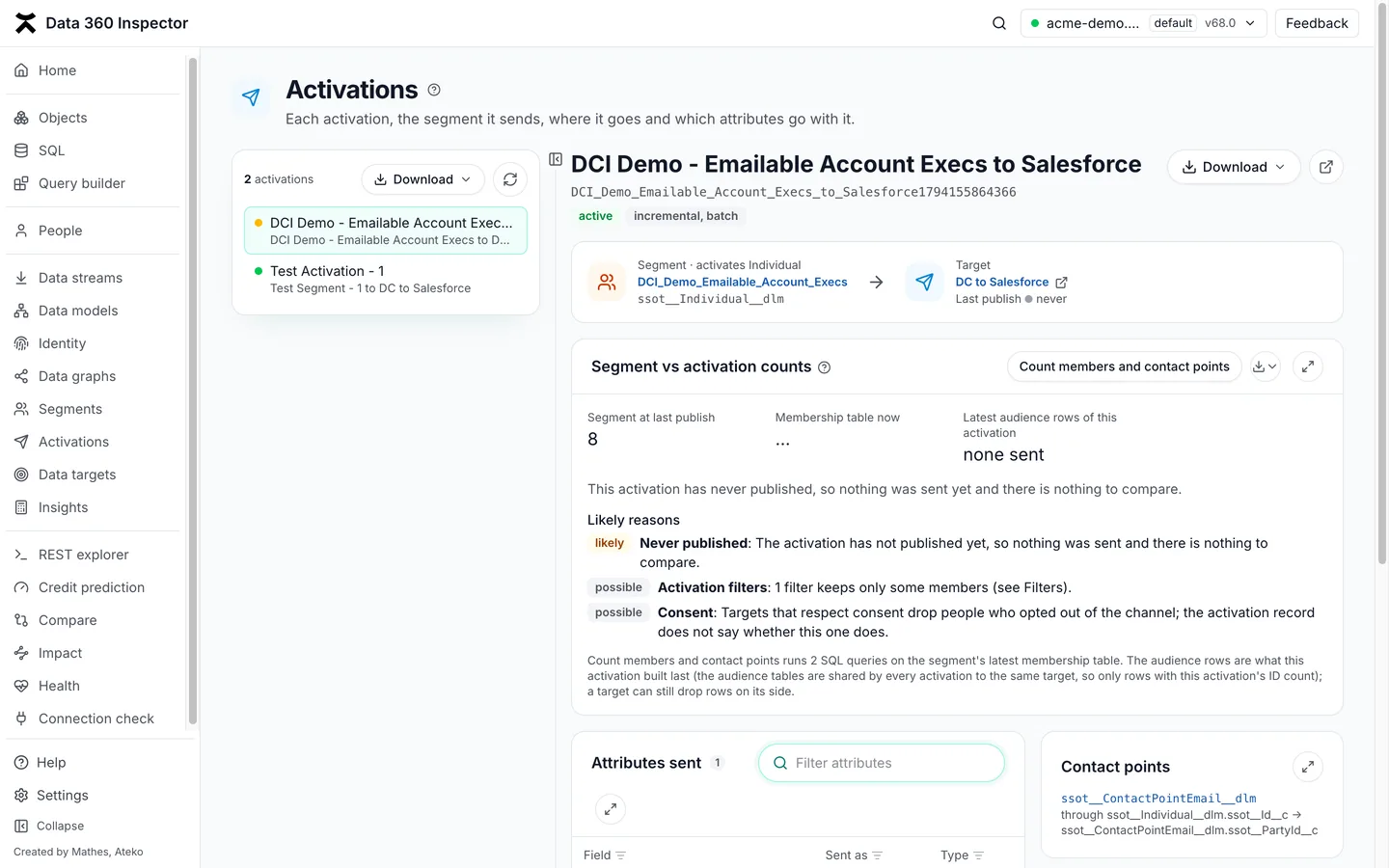
Video coming soon.
From the article Why did my Data Cloud activation send fewer people than the segment has? (part 20 of the series).
The segment says one number, the target platform says a smaller one, and someone in marketing wants to know where the rest went. In Salesforce Data Cloud, the answer can sit in several places: the activation's contact point, its filters, consent, or a publish that ran before the segment refreshed. Each of those lives on a different part of the activation's setup, and none of them tells you how many people it dropped.
Today follows a segment out of Data Cloud, through the activation that sends it to a target.
Every activation, with a status dot
The Activations page lists every activation in the selected data space. Each line has the activation's name, "segment to target" under it, and a dot in the same colours Health uses: red for a failed last publish, amber for one that was never published, grey for inactive and green for OK. On my demo org, Test Activation - 1 has a green dot and DCI Demo - Emailable Account Execs to Salesforce, which has not published yet, an amber one. Download gives the list as a document or a spreadsheet, with a Health column that says why each one got its colour.
Segment to target at a glance
Open an activation and the top of the page answers the first three questions: what it sends, where, and whether the last publish worked.
The badges under the name give the status and the refresh and processing type, and, when they apply, two settings that matter later: "deletes not sent" and "updates not sent". The segment links to its page on Segments, and the target links to its page on Data targets, which is tomorrow's topic. The icon in the top right opens the activation in Salesforce.
Attributes sent
The Attributes sent table lists every field the activation sends, with three columns:
- Field: the object as a badge, the field's API name and its label.
- Sent as: the name the target receives.
- Type: the field's data type.
Sent as is the column I check most. When a target complains about a missing column, the answer is usually here, because the name the target sees is often not the field name in Data Cloud: Test Activation - 1 sends ssot__FirstName__c as FirstName and ssot__Id__c as Id. Filter attributes narrows the table by object, field, label or output name.
Contact points, filters and audience
Three smaller cards sit next to the attributes.
Contact points lists the object each contact point comes from, with the path the activation follows to reach it, written as "through" and the object and field names joined by arrows: "through ssot__Individual__dlm.ssot__Id__c → ssot__ContactPointEmail__dlm.ssot__PartyId__c".
Filters shows each activation filter in plain words instead of the JSON Data Cloud stores. A filter on the segment's own object reads "Direct filter:", followed by its conditions, with "All of these (AND):" or "Any of these (OR):" for groups. A limit on related rows reads as "Keep at most 3 Purchase rows, ordered by PurchaseDate descending". The original JSON is folded under "Filter 1 as JSON" for when you need the exact text. With no filters, the card says "None: every segment member is activated."
Audience gives the Latest and History audience objects with this activation's row counts, and when the latest audience was built. The audience objects belong to the data target, not the activation: every activation to that target writes into them, so the Inspector counts only the rows with this activation's ID and says so under the card.
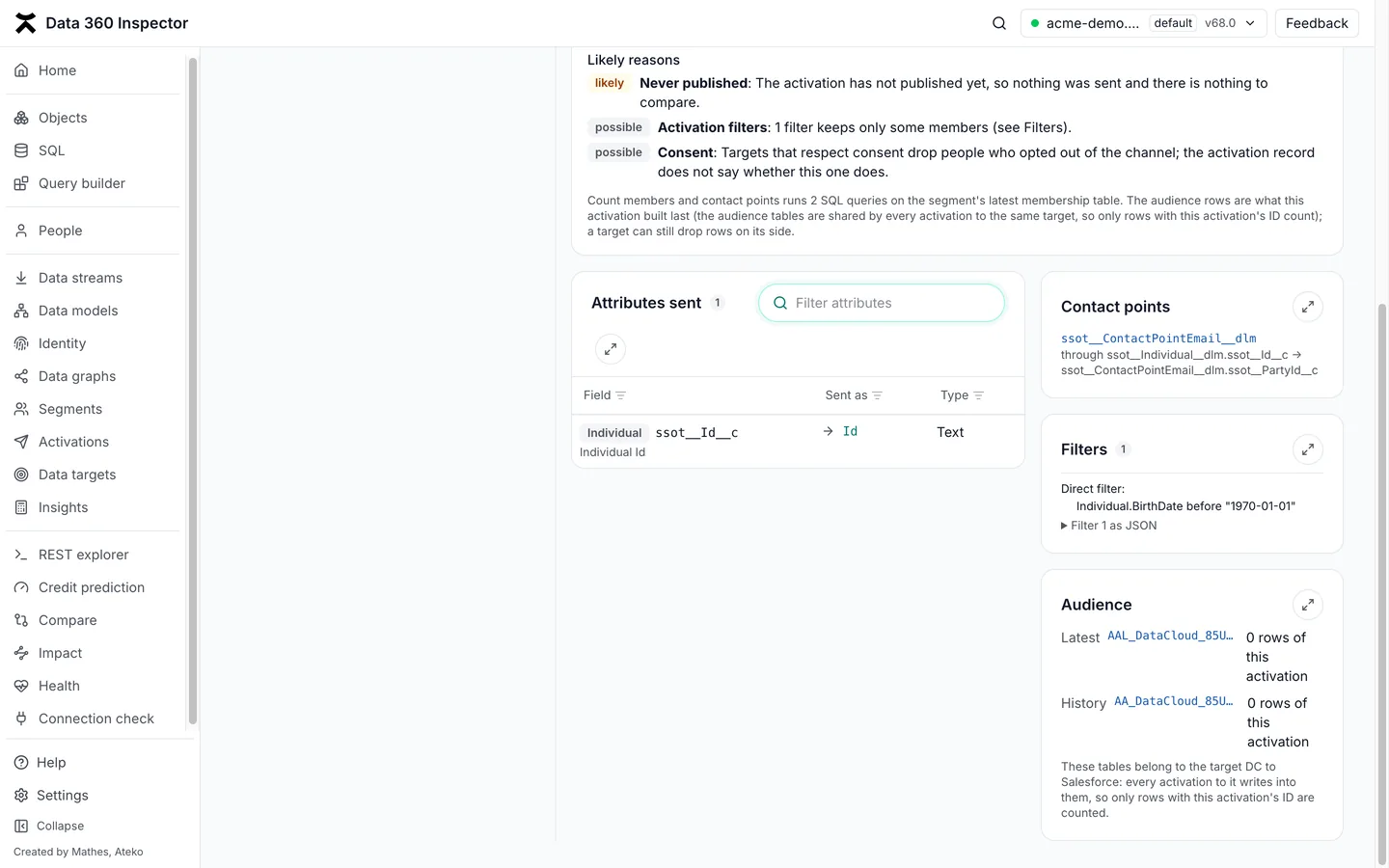
The DCI Demo activation narrows its segment again: of the eight emailable Account Executives, only those born before 1970 are sent. That kind of filter is easy to forget when the segment count is the only number in view.
Segment vs activation counts
The Segment vs activation counts card puts the numbers side by side:
- Segment at last publish: the count Data Cloud stored on the segment.
- Membership table now: the segment's rows in its latest membership table.
- Latest audience rows of this activation: what was built for the target last time, counting only this activation's rows in the target's shared audience tables.
- Published count: shown only when the activation record carries a count of its own.
The line under them gives the difference in words, such as "12 fewer sent than in the segment (8%)." or "The counts agree." An activation that never published says "This activation has never published, so nothing was sent yet and there is nothing to compare." instead.
The membership count needs a query, so it waits for the Count members and contact points button. That button runs one query for the membership count and one per contact point, and the note under the card says how many: "runs 2 SQL queries on the segment's latest membership table". The contact point queries count the segment members who have no row in that contact point object at all.
Under the numbers comes a list of Likely reasons, each marked "likely" or "possible" for this activation:
- Never published, or Last publish failed, when the activation's own status says so.
- Contact point, with the number of members without one, or "Every member has a ContactPointEmail row", and an Open in SQL link to see the query.
- Activation filters, when the activation has any.
- Consent, as a possibility when the target may respect opt-outs, or as likely when the activation record mentions it.
- Refresh timing, when the segment published after the activation last ran, so the two counts come from different runs.
- More rows than members, when the activation sent more than the segment holds: one row per contact point, or per related record.
- Deletes not sent, when people who left the segment stay at the target.
- Different entity, when the activation sends another object than the one the segment is on.
The likely ones come first. The missing contact point is the reason I check first, and having its count next to the difference turns a vague "some people have no email" into a number.
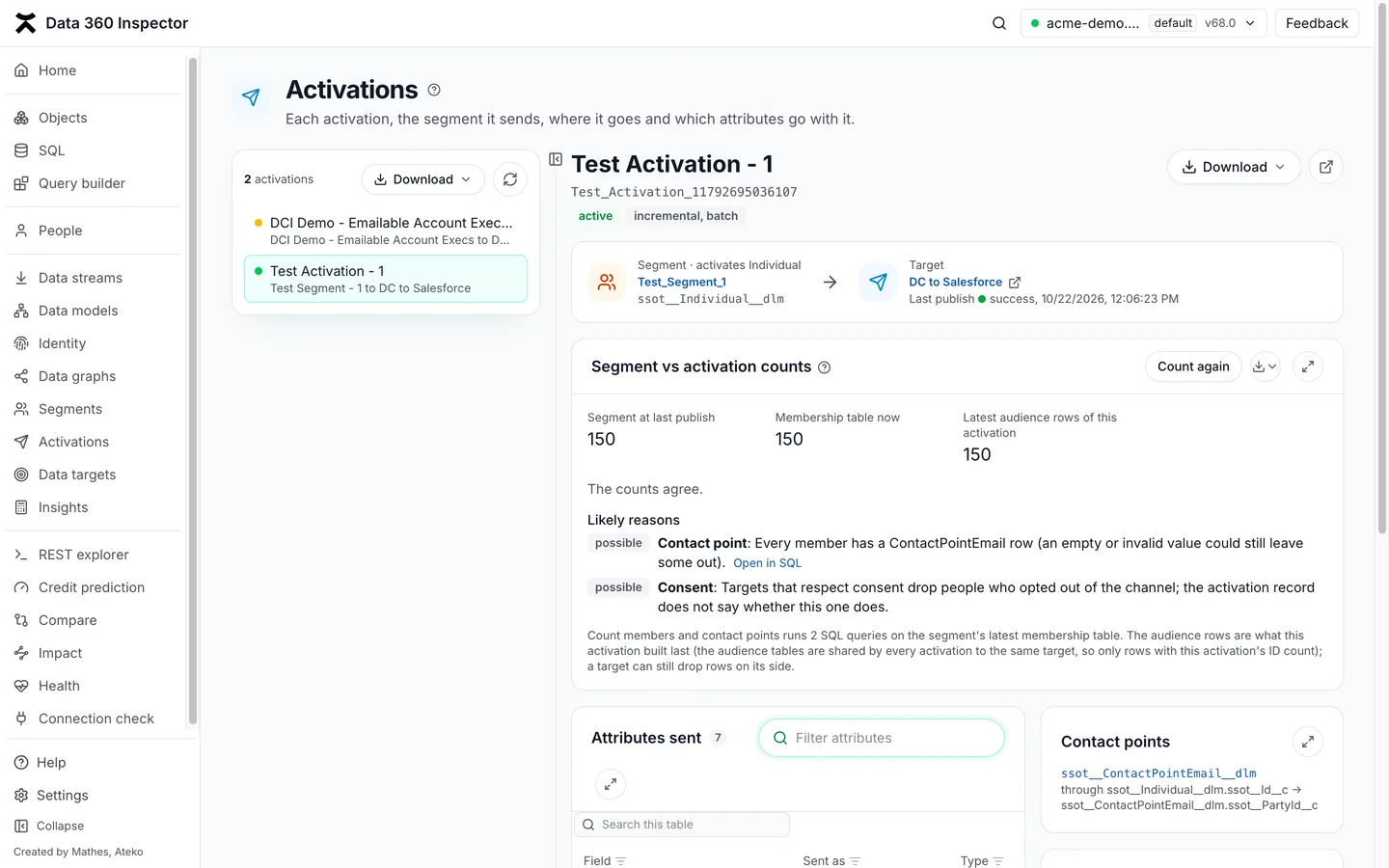
For Test Activation - 1 the three numbers agree at 150, and the only reasons left are the possible ones that no count can rule out.
Download
The Download menu at the top gives the whole activation as a document: details, attributes with their output names, contact points, each filter in words and as JSON, and the audience. The spreadsheet download holds the attributes table. I use it when a target owner asks "what exactly do you send us?"
Limits
A few things to know:
- The audience objects are named after the data target, not the activation, and are shared by every activation to that target. The counts keep only the rows with the activation's ID; a target that writes rows without it would show 0 here.
- The audience rows are what was built for the target, not what the target accepted. A target can still drop rows on its side, and the Inspector cannot see that.
- The activation record does not say whether it applies consent, and the field that holds a published count is not documented, so both are read by looking for keys with "consent" or "count" in their names.
- The contact point count finds members with no contact point row. A row with an empty or invalid address still counts as present.
- The contact point query joins on the party ID field unless the activation's contact point path names another one.
- Opening an activation counts the rows of its audience objects, which are small data queries.
The Inspector is free on the Chrome Web Store: https://chromewebstore.google.com/detail/data-cloud-inspector/ghiojkipoephhlkcgcgochoihogiahog