 Data 360 Inspector
Features · Data pipeline
Mapping coverage
Lake object fields mapped nowhere, and model fields nothing fills.
Video coming soon.
From the article Which Data Cloud fields does nothing fill? (part 13 of the series).
A marketer asks me why a segment on a field of the Individual object finds nobody. The field is right there in Data Cloud, it has a label and a type, and it shows up in Segment Builder. It also has no value in any row, because no data stream maps anything into it. The same thing happens the other way around: a source sends a loyalty tier in every file, and the field lands in a Data Lake Object (DLO) where nothing ever reads it.
Neither problem raises an error. Data Cloud is happy to keep an empty Data Model Object (DMO) field forever, and happy to ingest a DLO field that goes nowhere. You find out when someone builds on the empty field, or when someone asks why the data they send is not in the profile.
Where to find it
Open Data models in the sidebar and pick Coverage, next to Table and Diagram at the top right. The choice is kept in the address (/models?view=coverage), so a link to the page opens straight on Coverage.
Coverage runs no SQL queries. It works from two things the Inspector already reads for the table and the diagram: the metadata catalog (every DLO and DMO with its fields) and the field mappings of every DMO. That makes it cheap to open on any org, because metadata calls use no Data Cloud credits.
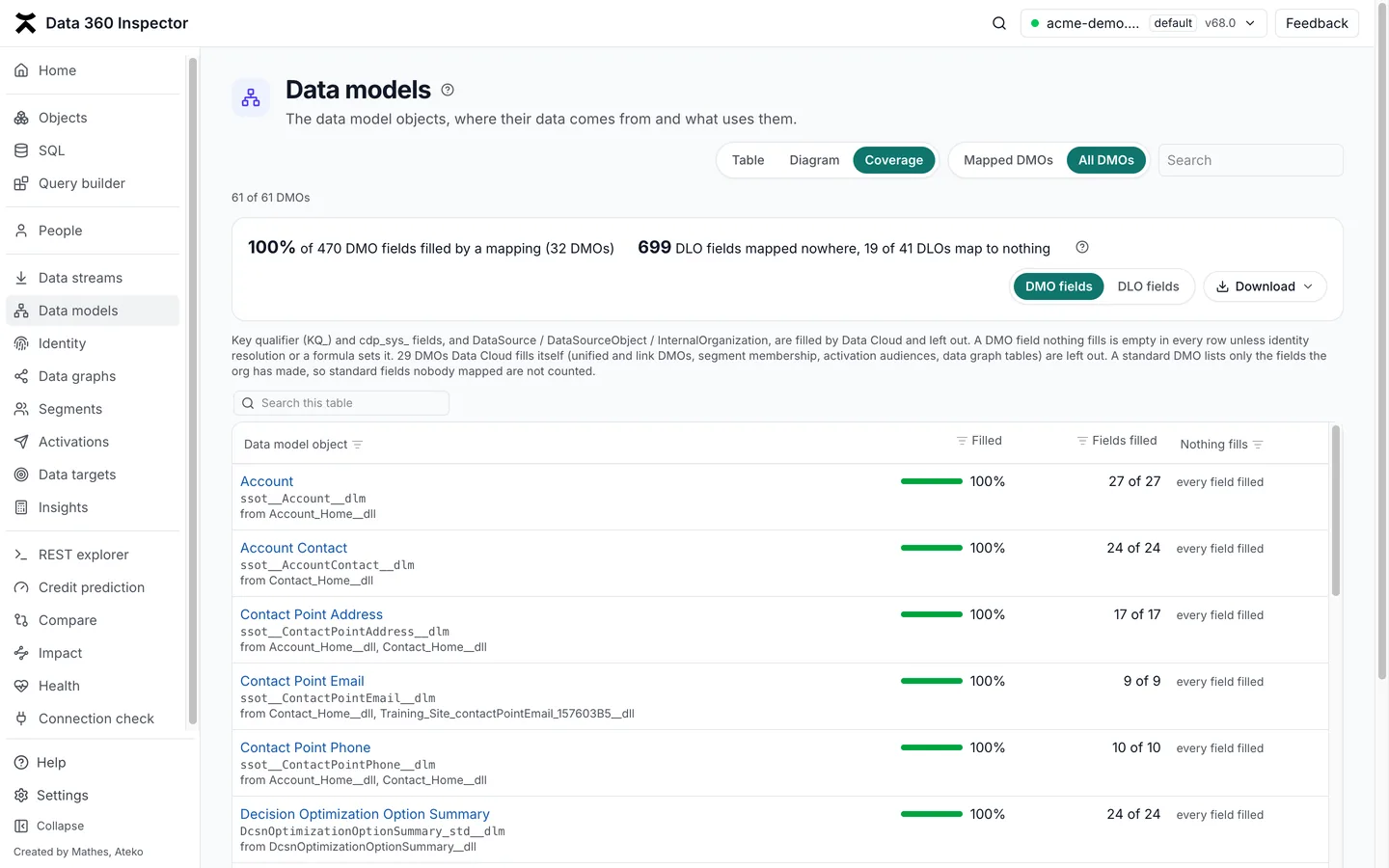
The summary card at the top gives the two headline numbers for the selected data space. On my demo org, with Mapped DMOs, it reads "100% of 470 DMO fields filled by a mapping (32 DMOs)" and "699 DLO fields mapped nowhere, 19 of 41 DLOs map to nothing". Every DMO that something feeds has all its fields filled, because the Salesforce CRM streams were set up with their standard mappings. The gaps on this org are all on the DLO side, which is common for a young org and the reverse of what I usually see on an older one.
DMO fields nothing fills
The DMO fields side lists every DMO with something mapped into it, least covered first. For each one you see:
- The DMO's label and API name, and the DLOs it is mapped from.
- Filled: the share of its fields that at least one mapping fills, with a bar that is red under 40%, amber under 75% and green above.
- Fields filled, as "x of y".
- Nothing fills: the API names of the fields no mapping fills, the first eight, with "all N" to show the rest.
The Mapped DMOs and All DMOs switch at the top of the page applies here too. Mapped DMOs (the default) hides DMOs that nothing feeds at all, because a standard DMO you never use would otherwise sit at the top with 0% and bury the useful rows. All DMOs brings them back, which helps when you want to see every standard object Data Cloud gave you and which ones are still empty. DMOs that Data Cloud fills itself are left out in both views, and the note above the table says how many: unified and link DMOs, segment membership, activation audiences and the tables behind data graphs. No mapping fills them, and none should, so they would only sit at the top at 0% and look like work to do. On my demo org that leaves nothing for All DMOs to add: 29 of the 61 DMOs are Data Cloud's own, the other 32 are all mapped, and every one of them is at 100%.
A DMO near the top of this list is not always a problem. Standard DMOs such as Individual come with many fields, and few orgs fill all of them. What I look for is a field that someone uses, in a segment or a calculated insight, that shows up under Nothing fills. The DMO name links to its Objects page, where Used by shows exactly that.
DLO fields mapped nowhere
Switch to DLO fields for the other direction. Every DLO is listed, with the ones that map to nothing first and then the ones with the most unmapped fields. For each DLO you see:
- Its label and API name, and a link to the data stream that loads it.
- Maps to: the DMOs it feeds, or an amber "mapped to nothing" badge.
- Mapped nowhere: "N of M mapped" and the names of the fields that go nowhere, the first eight, with "all N" for the rest.
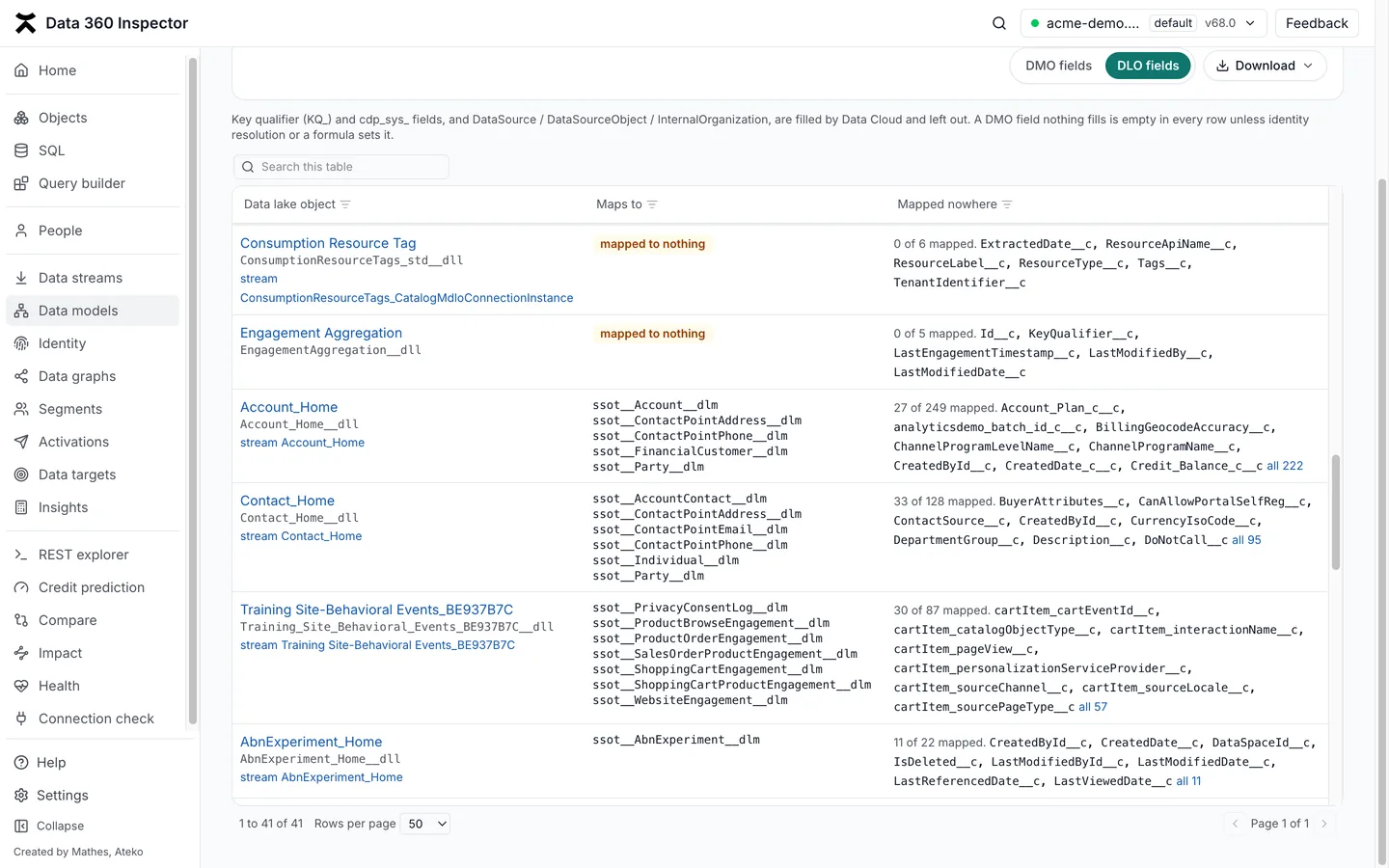
On my demo org the first 19 rows are DLOs mapped to nothing, most of them the Digital Wallet consumption objects (TenantHourlyEntitlementConsumption, TenantEnrichedUsageEvent and the like), which are read by SQL rather than through the data model. The first partly mapped DLO is Account_Home__dll: 27 of its 249 fields are mapped, because a Salesforce CRM stream brings every field of Account, custom ones included, and the standard mapping uses a few.
A DLO mapped to nothing is data you ingest and pay for without using it in the data model. Sometimes that is on purpose, for example a staging stream that feeds a data transform. More often it is a stream someone set up for a project that never finished mapping.
An unmapped field on a DLO that is otherwise mapped is the case that started this view. It usually means the source sends something useful that nobody added to the mapping when the stream was set up, or that a new column arrived later.
System fields are left out
Some fields are filled by Data Cloud itself, never by a mapping. Counting them would make every DMO look worse than it is, so Coverage leaves them out on both sides:
- Key qualifier fields (names starting with
KQ_). - Fields starting with
cdp_sys_. - DataSource, DataSourceObject and InternalOrganization.
The page says this in a line above the table, and adds a reminder that a DMO field nothing maps can still get a value from identity resolution or a formula. Unified objects are the obvious case: their fields come from reconciliation rules, not from a stream.
Search and download
The Search box at the top of the page filters both sides by label or API name. Download (the small menu on the summary card) gives the whole view as a document or a spreadsheet: a summary, the DMO table with Mapped from and the full Nothing fills list, and the DLO table with Stream, Maps to and the full Not mapped list. The spreadsheet is the version I send to whoever owns the data streams, with a column to say "map it" or "drop it".
Limits
A few things to know:
- Coverage reads mappings, not data. A field can be mapped and still empty in every row, because the source column is blank. To check values, query the field on the SQL page.
- Field names in the mappings are matched to field names in the catalog as they are. I have not seen them differ, but if they ever do, a field would show as unfilled when it is not.
- Fields filled by identity resolution, formulas or data transforms count as "nothing fills". The note above the table says so, but the list itself does not tell those apart.
- The Mapped DMOs and All DMOs switch only changes the DMO side. The DLO side always lists every DLO.