 Data 360 Inspector
Features · Personalization and marketing
Marketing Cloud Next
Consent, marketing flows and campaigns.
Video coming soon.
From the article Why did this person not get the email? Marketing Cloud Next from Data Cloud (part 32 of the series).
"She signed up last week and never got the welcome email." In Marketing Cloud Next that question runs through several places: the flow that should have sent it, the consent records at four levels, the contact point, the send history in Data Cloud and the merge fields in the email itself. Each lives in a different part of Salesforce, and some of them only in Data Cloud.
Today covers the three pages for Marketing Cloud Next: Marketing flows, Campaigns and the Marketing Cloud Next page. All three are hidden until you turn them on in Settings > Pages, because most Data Cloud users do not need them. With Marketing flows or Campaigns on, People also shows the Marketing Cloud Next panels for consent and message history.
Marketing flows
Marketing Cloud Next sends email, SMS and WhatsApp from Flow Builder flows. Marketing flows lists them with type, trigger, status and last change.
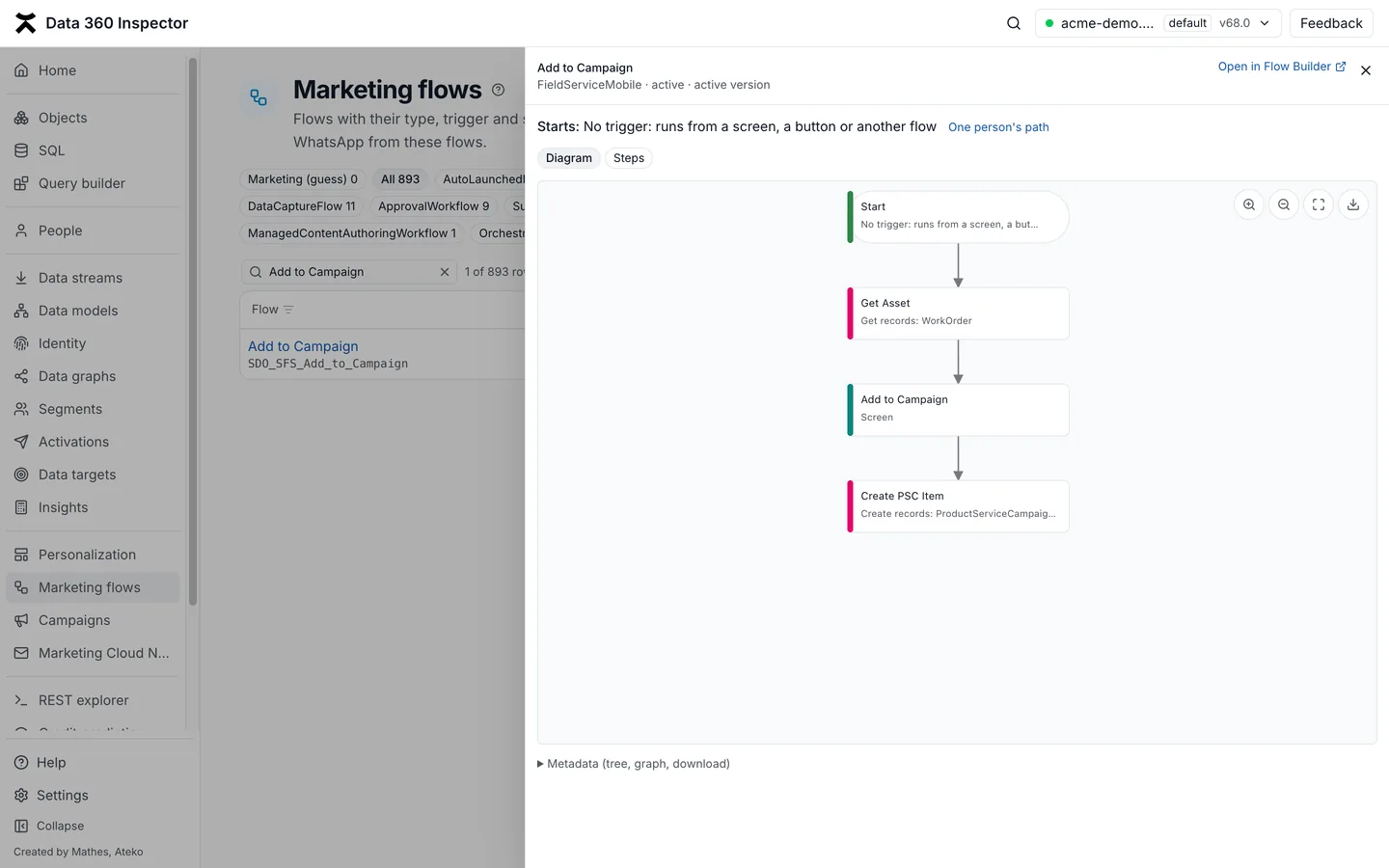
I have not yet seen which flow types and triggers mark a marketing flow on an org with Marketing Cloud Next. So the page lists every flow and offers chips: Marketing (guess), from types and triggers that look like marketing (segment, event, activation, Data Cloud, on demand, broadcast), All, and one chip per flow type. My demo org has no Marketing Cloud Next flows: Marketing (guess) shows 0 and All shows 893, most of them AutoLaunchedFlow and Flow from the org's sample apps.
Open a flow and a side panel reads its active version (or the latest one) and shows:
- Starts: what starts it, such as a segment, an event, a record or a schedule.
- Diagram and Steps: the steps in order, with decisions, waits and their branches.
- Open in Flow Builder, and One person's path, which leads to the Flow path tab below.
The panel works on any flow, so I opened Add to Campaign, a screen flow from the sample apps. A flow from an installed package is the exception: Salesforce does not let its steps be read, so the header names the package, such as "from the healthcloud package, steps not readable", and the panel says why instead of drawing anything.
Campaigns
Campaigns lists Campaign records with type, status, dates, contacts and responses, with an Active only box. Open one to see its members by status, and, where an engagement object in the data space has a campaign field, the sends, opens, clicks and other actions recorded for that campaign. If no engagement object has a campaign field, the panel says so instead of showing zeros. In my demo org the list holds the sample campaigns, such as Industry Tradeshow (Event, In Progress, 3 contacts, 29 responses) and Nurture Marketing Campaign.
The Marketing Cloud Next page
The Marketing Cloud Next page has nine tabs. Every Data Cloud query and data graph read on it runs only when you press its button, because both use credits.
Consent shows the four consent levels and what each covers:
- Level 1, Individual (global): the person's opt-out flags, across every channel.
- Level 2, Channel: one channel across all of the person's addresses or numbers.
- Level 3, Contact point: one email address or phone number.
- Level 4, Contact point and subscription: one address for one subscription.
Type an email address or phone number and Show consent lists the records at each level, with their status and capture date, and a headline: "Something blocks marketing" or "Nothing blocks marketing". The page also warns about setup gaps, such as a subscription with no channel types, so nobody can consent to it.
Above the box, a line sums up the setup; my demo org has 1 communication subscription (Marketing), 1 subscription channel type and 7 engagement channel types, 3 of them active. For the sample person Jamie Green's address, there are no consent records at any level, and no Contact Point Email record in Salesforce with that address, so the page says levels 1 to 3 have nothing to hang on, and "Nothing blocks marketing".
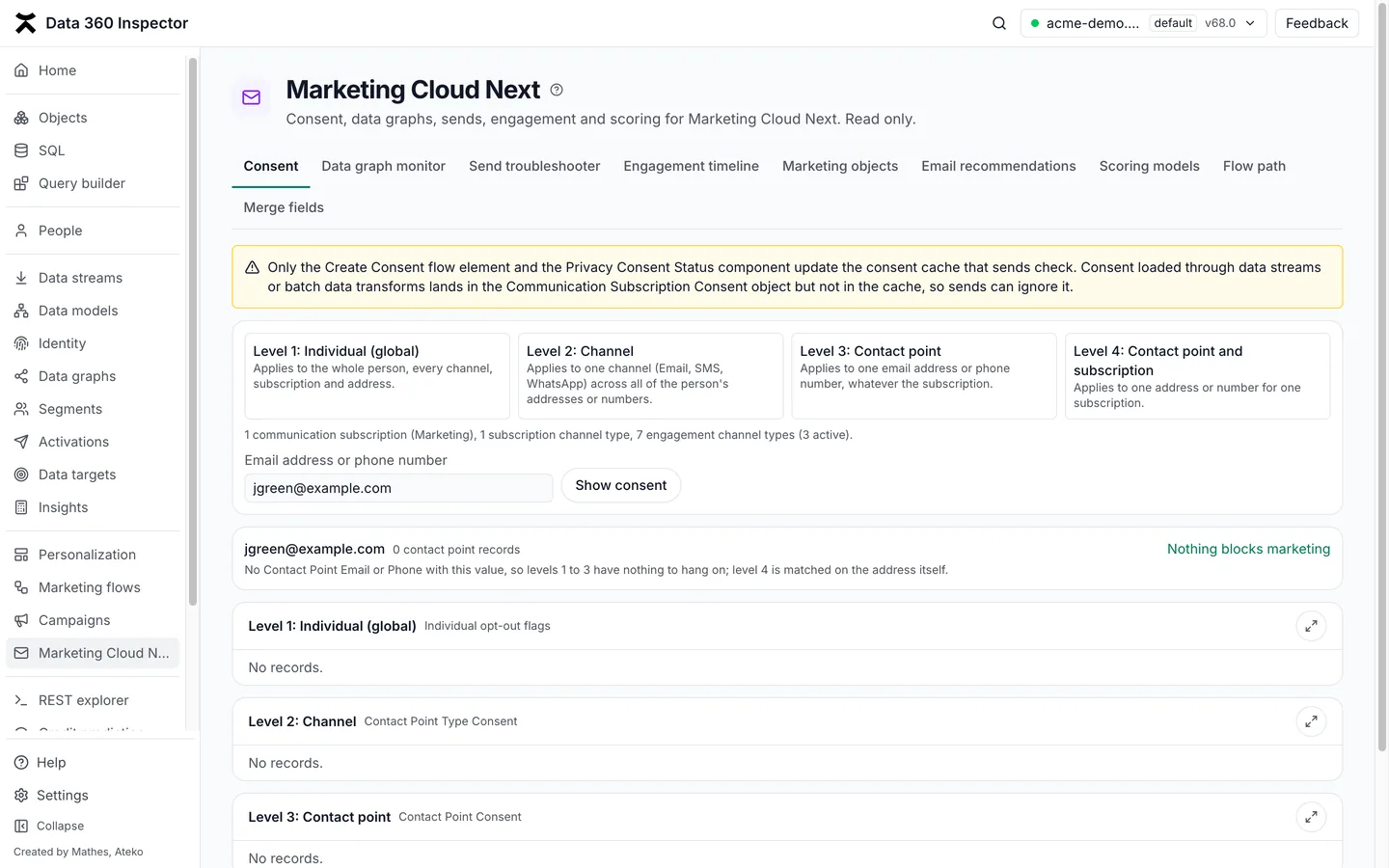
The amber box at the top of Consent is the warning I wish I had read earlier. Only the Create Consent flow element and the Privacy Consent Status component update the consent cache that sends check. Consent loaded through data streams or batch data transforms lands in the Communication Subscription Consent object but not in that cache, so sends can ignore it.
The other tabs, in order:
- Data graph monitor: every data graph with status, refresh schedule, last refresh and record count, flagging failed runs and graphs with no refresh in over twice their schedule, plus one record as JSON.
- Send troubleshooter: for one Individual ID, the events from the message engagement objects (email, SMS, WhatsApp, push), counted by action, with every failed, bounced or suppressed send and its reason.
- Engagement timeline: the same person's engagement, grouped by day.
- Marketing objects: the profile, engagement, segment membership and insight objects, with fields and Preview 10 rows.
- Email recommendations: pick the recommenders an email uses and its data source's profile data graph, paste the HTML, and see whether they share the profile data graph and whether each image URL is covered by an active Trusted URL in Setup.
- Scoring models: scoring model definitions with ratio, schedule and rules, and a record's scores by lead, contact or account ID.
One person's path through a flow
Flow path brings it together. Pick a flow and a person (search by email, phone, name or ID, or paste an Individual ID), add their email or phone for the consent check, and press Show the path.
The page pieces the path together from whatever run history the org has: flow run and message engagement objects in Data Cloud, and Salesforce flow interviews and their logs. The flow's diagram then highlights the steps and connectors the person went through, and outlines the step where they stopped: red for failed or suppressed, amber for waiting or stopped, green for the end of the path.
In my demo org there is no run history to piece together, so the result for Add to Campaign and Jamie Green says so, and the diagram highlights only the start.
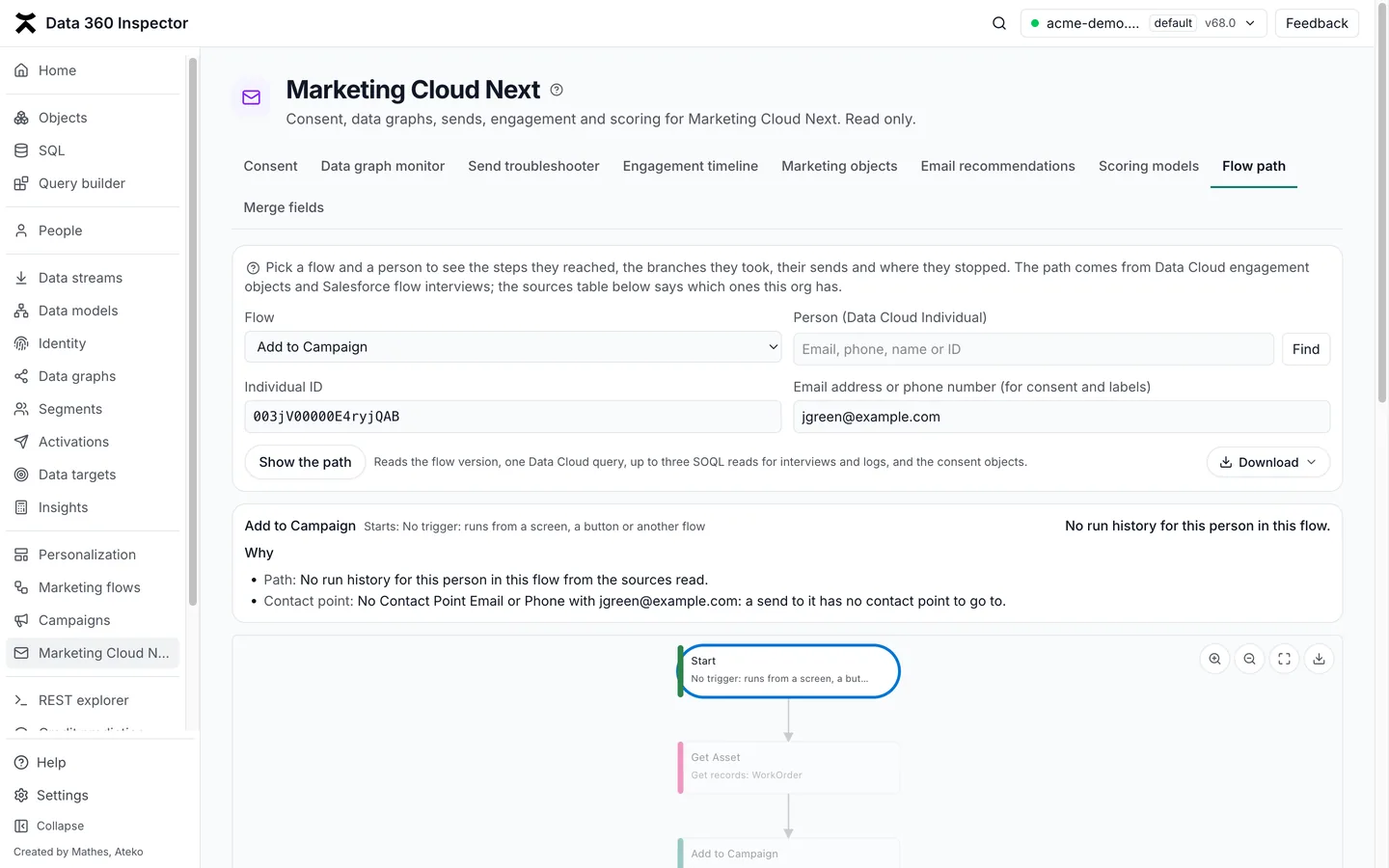
Under the diagram, Why lists the reasons in plain words. They cover the path itself, each consent level that blocks, a missing contact point, suppression or frequency limits on a send, and the flow's own conditions. A Sources read table says which sources the org has, which were read and how many rows each gave for this person, so an empty path is never a mystery.
Merge fields
The last tab checks the email itself. Read emails lists email templates and Marketing Cloud Next email content (100 of each), or you paste HTML. Check merge fields finds the tokens in each one: handlebars like {{{Recipient.FirstName}}}, classic merge fields like {!Contact.FirstName}, and Marketing Cloud Engagement strings like %%FirstName%%.
Per email you get the number of tokens, missing fields, tokens without a fallback and tokens not checked. A token without a fallback prints nothing when the value is blank, which is how "Hi ," ends up in an inbox. Preview values reads one person's data graph record and shows what each token would print, with "Blank and no fallback: prints nothing" where that would happen.
Limits
A few things to know:
- I have not had an org with live Marketing Cloud Next sends, flows and scores, so the engagement object names, the flow run objects, the email content object, the token syntax of Marketing Cloud Next emails and the scoring objects are guesses. Each tab says so where it applies.
- Marketing (guess) on Marketing flows is a guess from type and trigger names; All always lists every flow.
- Flow path matches flow interviews to a person by label, which does not always name the person.
- Consent shows the records, not the consent cache sends check, which the extension cannot read.