 Data 360 Inspector
Features · Segments and activation
Why is this person in the segment?
One person against a segment, rule by rule.
Video coming soon.
From the article Why is this person in my Data Cloud segment, or not? (part 18 of the series).
"I am in the test segment, so why did I not get the email?" When a colleague asks that, the answer in Data Cloud takes a while. You find their unified profile, check the segment's membership, open the criteria, then look up each field the criteria use, on the profile and on every related object, and compare by eye. With five rules, an exclusion and a nested segment, it is easy to miss the one that decides.
Find the person
Type an email, phone, name or ID and press Check. How the Inspector finds people depends on what the segment is on:
- A segment on Individual: it searches source individuals the same way People does.
- A segment on a unified individual object: it searches through the identity resolution ruleset that builds that object, and checks the unified profile IDs. Matches that the ruleset has not unified are noted, because they cannot be members.
- A segment on anything else: type that object's record ID.
When several people match (a common last name, a shared email), the card checks each one, up to 50, and suggests an email or ID to narrow it down.
The verdict
Each person gets one line that combines two facts: are they in the latest membership table, and do they match the criteria now. The line reads one of:
- Member.
- Member, but no longer matches: leaves at the next publish.
- Not a member yet, but matches now: joins at the next publish.
- Not a member, and does not match.
- Not a member (the criteria could not be checked).
Under the verdict, the card adds when the person entered the membership table, and what the membership history table says: the latest publish that included them, the change type, and whether they left. On my demo org, Jamie Green in Emailable Account Execs reads "Member", "In the membership table since 11/8/2026, 8:30:16 AM" and "History: latest publish with them 11/8/2026, 8:30:16 AM, new". If the latest table has no row but the history says the last publish kept them in, the verdict reads "Member (from the history)". When the person is in segments nested under this one, those are listed with their names and history too.
That alone answers most questions. "Not a member yet, but matches now" is the classic one: the person was added to the source yesterday and the segment has not published since.
Rule by rule
When the search finds exactly one person, the card goes further and checks every rule of the criteria on its own, including rules inside nested groups, count rules on related records, rules on another segment, and the exclude criteria.
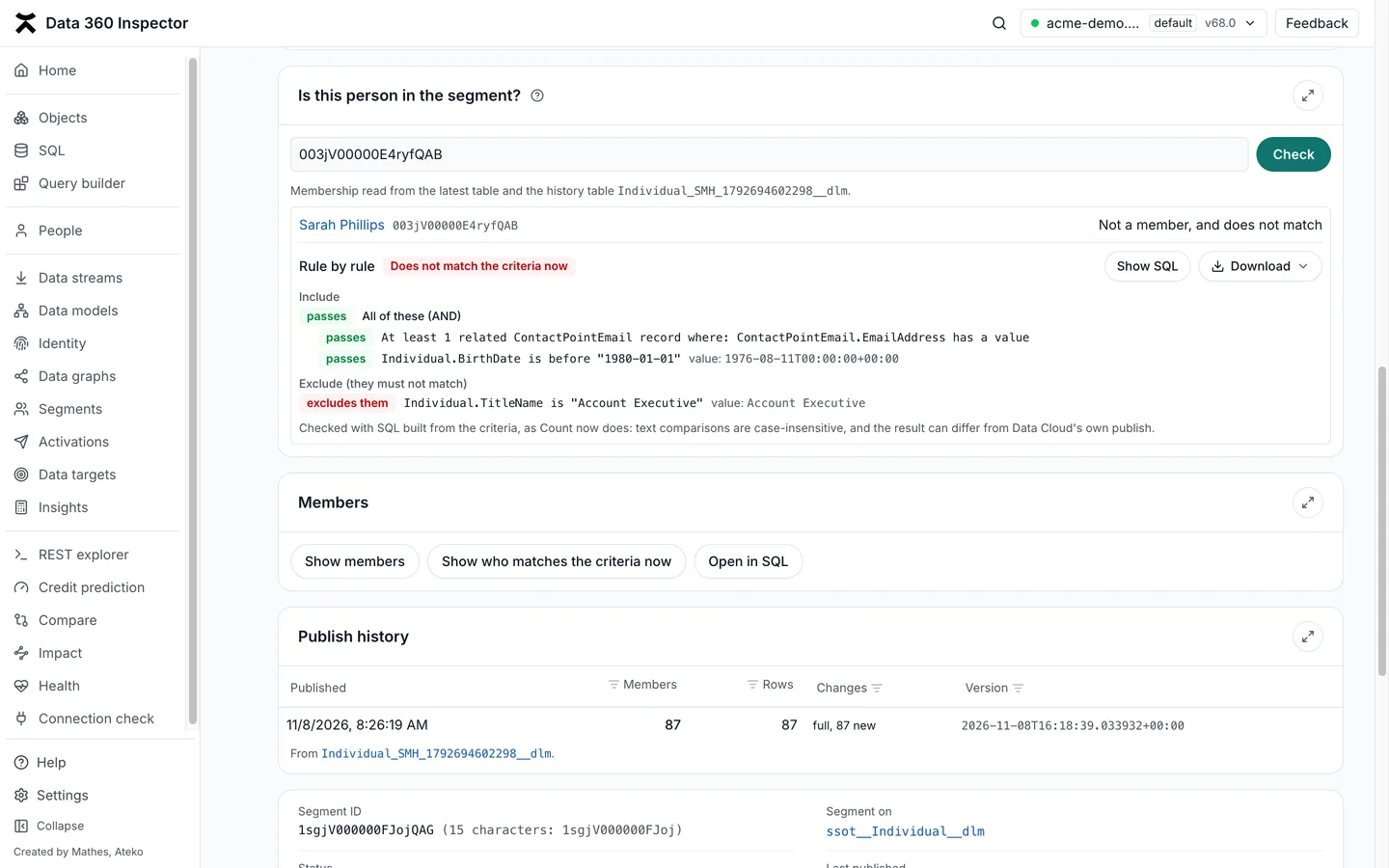
My demo segment Emailable, not Account Execs wants people with an email address who were born before 1980, and excludes Account Executives. Sarah Phillips is an Account Executive born in 1976, and the check shows exactly why she is out.
Every include rule passes, and the exclusion matches her, which is what shuts her out: its badge reads "excludes them" in red. Every line gets a badge:
- Passes or fails, for a rule the Inspector could turn into SQL. In the exclude part, a rule that matches reads "excludes them" instead of passes, because matching an exclusion keeps the person out.
- Not checked, with the reason in brackets, for a rule it could not.
- Could not check, when the query for that rule failed.
Groups get a badge too, worked out from their rules: an AND group passes when every rule passes and fails as soon as one fails, an OR group passes as soon as one rule passes. When some rules were not checked, the group says not checked rather than guessing.
Next to a rule on the person's own fields sits their value, as "value: ...", such as "value: 1976-08-11T00:00:00+00:00" for the birth date. For a rule on a field of a related object, such as an order, it shows the values of the related rows instead, the five most common with how many times each appears, then "and N more" and the number of related rows read. "no related rows" is often the whole answer: the rule needs an email, and this person has none.
Exclude criteria are listed separately under "Exclude (they must not match)". A person fails the segment when the include criteria fail or the exclude criteria pass, and the badge at the top (Matches the criteria now, Does not match the criteria now, or Could not tell: some rules were not checked) follows that.
A rule on another segment reads "Is a member of segment "DCI Demo - Account Execs", as of its last publish", because it is checked against that segment's latest membership table.
When the whole-segment SQL cannot be built, the verdict line uses this result instead, so a segment with one untranslatable rule still gets an answer when the other rules settle it.
How it checks
The check is a handful of read-only queries, all for the one ID, and Show SQL lists every one of them:
- One SELECT with a CASE WHEN per rule, so every translatable rule is checked in a single query.
- One SELECT of the person's own fields that the rules use, when there are any.
- One SELECT per related object for the related rows' values, at most 200 rows each, when a rule reads a related field.
If the combined query fails, each rule runs on its own, so one rule that breaks the SQL does not hide the others, and the card notes what happened. If no record has that ID, the card says so plainly instead of failing every rule.
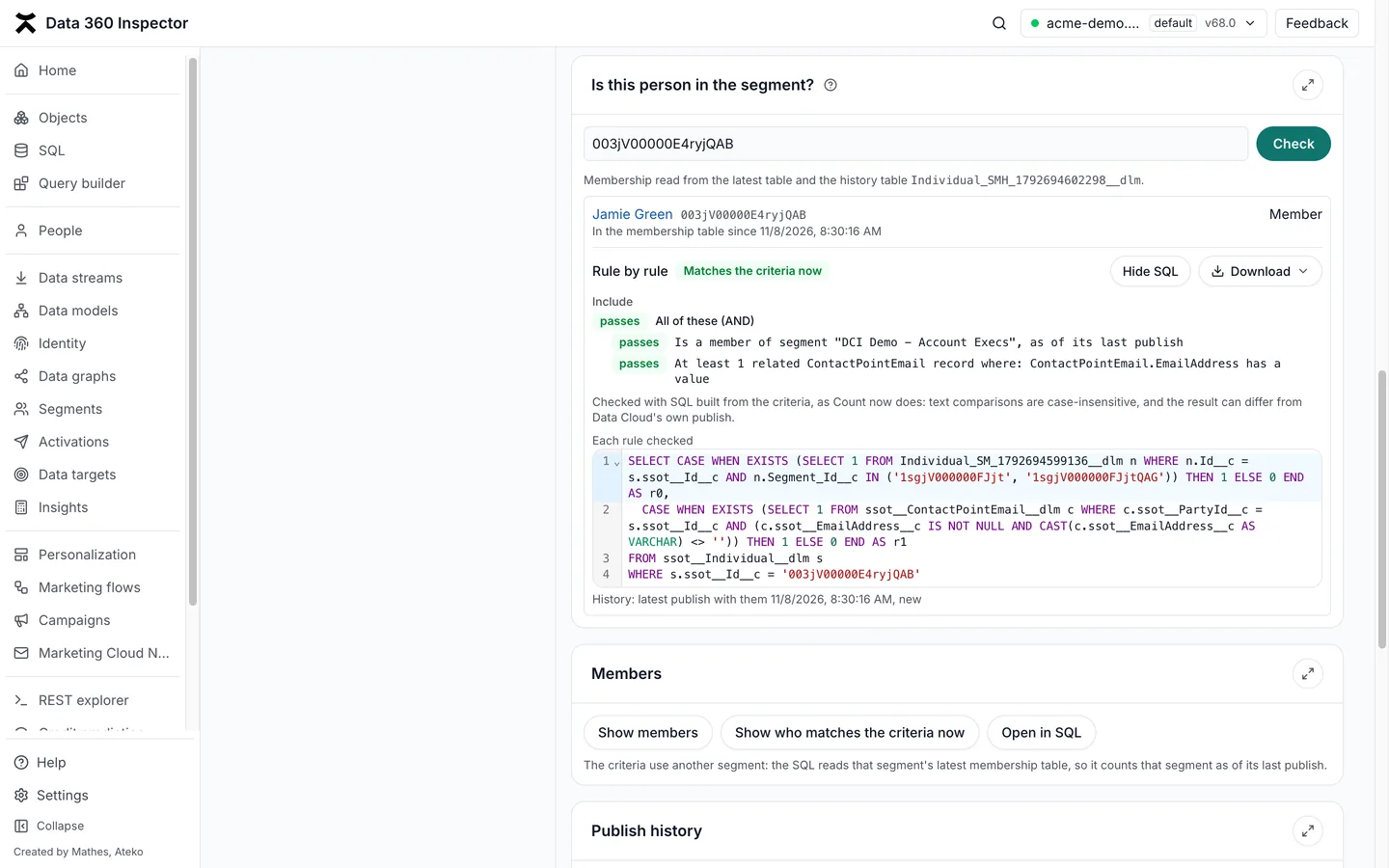
For Jamie Green both rules live in that one query: r0 reads the Account Execs segment's membership table, r1 looks for an email contact point. Neither rule reads a field of the Individual record itself, so there is no second query.
Download gives the check as a document or a spreadsheet: the record, the object, the result, the include and exclude rules with their status, values and reasons, and every query. I attach it to the support ticket when the answer is "the data is wrong", so the person who owns the source can see the value that failed.
When the search finds several people, the full rule check does not run. Instead, each person gets a short "Fails:" list with the top-level conditions they fail, enough to tell them apart before you search again by email or ID.
Limits
A few things to know:
- The check uses the same SQL translation as Count now, so text comparisons are case-insensitive and the result can differ from Data Cloud's own publish. The card says so under the rules.
- A count rule that sums or averages a related field, and a rule that follows a path of more than one relationship, are shown as not checked, with the reason.
- A rule on another segment is checked against that segment's last publish, not against its criteria now.
- Related rows are read up to 200 per object. Past that, the values line ends with "+" and may not show the row that matters.
- "Matches now" is about the data now. Membership comes from the last publish. When the two disagree, the verdict tells you which way the next publish will go, not why the last one did what it did.
The Inspector is free on the Chrome Web Store: https://chromewebstore.google.com/detail/data-cloud-inspector/ghiojkipoephhlkcgcgochoihogiahog