 Data 360 Inspector
Features · Health and governance
Clean-up candidates
What nothing uses, what never ran and what went quiet.
Video coming soon.
From the article Which Data Cloud objects, segments and streams can I clean up? (part 26 of the series).
Every Salesforce Data Cloud org I have worked in has a corner nobody wants to touch. A Data Lake Object (DLO) from a proof of concept, a segment named "Test - do not use" that still publishes every day, a data stream that last ran in spring. Someone asks "can we delete these?", and the honest answer is "probably, but let me check what uses them first", which turns into an afternoon.
Read-only advice
The first line on the tab says what it is: read-only advice. Nothing is deleted or changed, and the extension has no way to do either. Each row is a candidate to check in Salesforce before anything is removed.
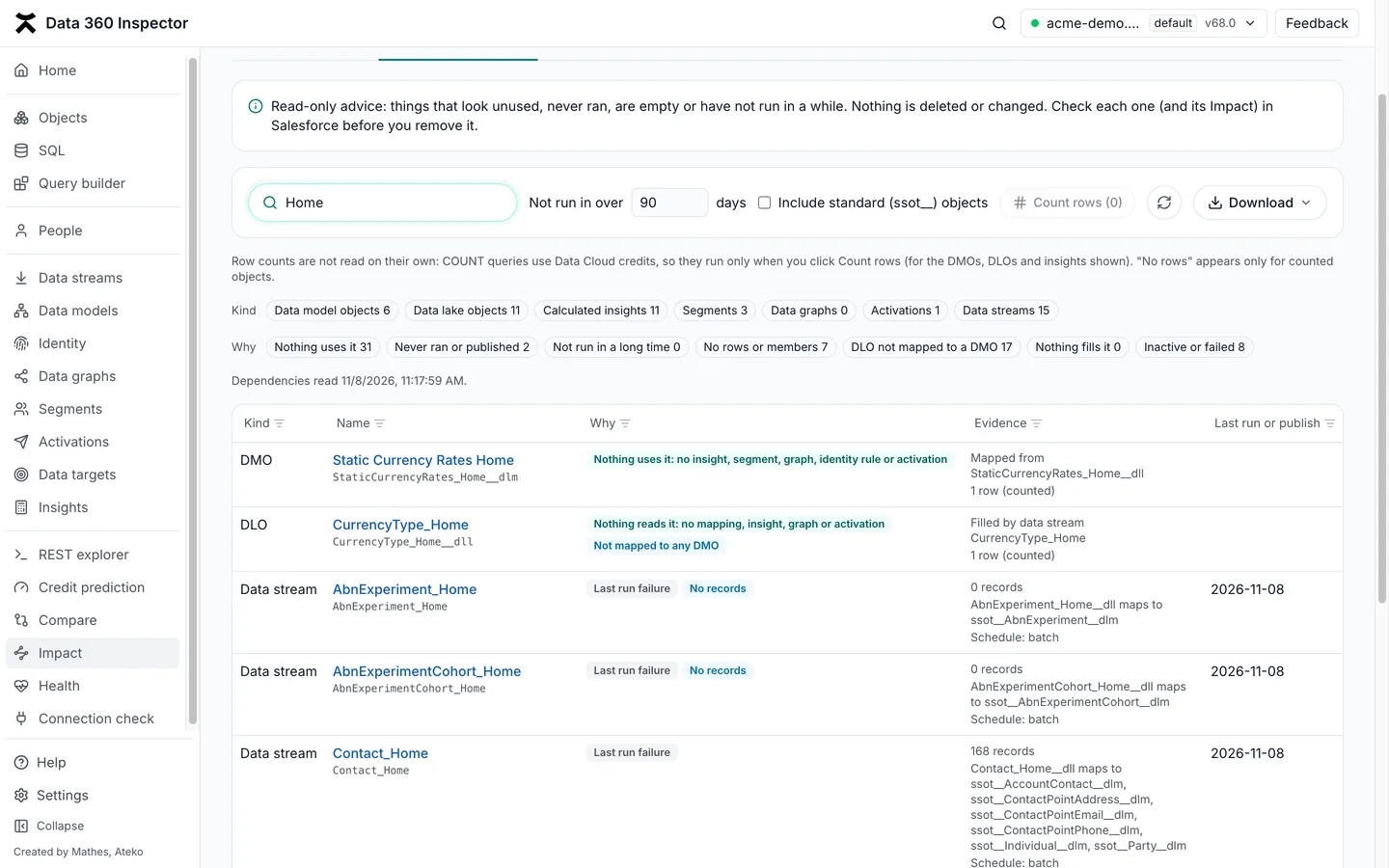
In my demo org the tab lists 15 DMOs, 11 DLOs, 11 calculated insights, 4 segments, 1 activation and 14 data streams, and 40 of them carry "Nothing uses it".
What it looks at
The list covers seven kinds:
- Data Model Objects (DMOs).
- DLOs.
- Calculated insights.
- Segments.
- Data graphs.
- Activations.
- Data streams.
Each row gets one or more reasons, from a fixed set:
- Nothing uses it: no mapping, insight, segment, graph, identity rule or activation reads the object, or no activation sends the segment and no other segment uses it.
- Never ran or published: a stream that never ran, a segment or activation never published, an insight that never ran, a data graph never built.
- Not run in a long time: the last run, refresh or publish is older than the number of days you set (90 by default).
- No rows or members: a segment with no members at its last publish, a data graph or stream with no records, or an object whose rows you counted (more on that below).
- DLO not mapped to a DMO.
- Nothing fills it: a DMO no mapping fills.
- Inactive or failed: an inactive status, or a last run or publish that failed.
"Nothing uses it" comes from the same dependency index as Impact, so it needs that index to be read first. Until it is read, the tab says so and shows the other reasons, without "Nothing uses it" or the mapping reasons.
Some objects are left out on purpose. Standard objects (the ssot__ ones from the Salesforce data model) are hidden unless you tick Include standard (ssot__) objects, because they are rarely yours to delete. DMOs that Data Cloud makes itself, such as unified and link DMOs, segment membership and activation audience tables, and the tables behind data graphs, are never listed. Zero copy streams are not flagged as "never ran", because they are queried live and have no refresh runs.
The evidence column
A reason on its own is not enough to delete something, so every row carries the evidence behind it. For the CurrencyType_Home DLO in my demo org, the reasons are "Nothing reads it" and "Not mapped to any DMO", and the evidence is "Filled by data stream CurrencyType_Home". Without a stream, the evidence says "No data stream fills it (a data transform may)". A data stream shows its record count, the mappings of its DLO and its schedule. A segment shows its member count at the last publish, its schedule and the object it is built on, for example "92 members at the last publish" for DCI Demo - Born before 1980, flagged because no activation sends it and no segment uses it. DCI Demo - Account Execs is not on the list, although no activation sends it: another segment, DCI Demo - Emailable Account Execs, includes it. An object that is used shows "Used by" with the count per kind, so you can see why it is not a candidate for that reason.
The Open column links to the item's own page and to its Impact (for a segment or activation, the Impact of the object it is built on; for a stream, the Impact of its DLO). That second link is the one I use most: before I suggest removing anything, I open its Impact and check what Impact itself does not cover.
Filters and days
The Kind and Why chips filter the table, each with its count: click Data streams and only the streams are left, click it again to bring the rest back. Find by name narrows it further. "Not run in over" sets the number of days for the stale check. The value is kept in this browser, so a team that thinks in quarters can set it once.
The refresh arrow reads the lists and the dependencies again, and the Download menu gives the filtered list as Markdown, Word, PDF, HTML or Excel, with the summary, the read-only note and what was not covered. That download is what I attach to a clean-up proposal for a client.
Row counts cost credits
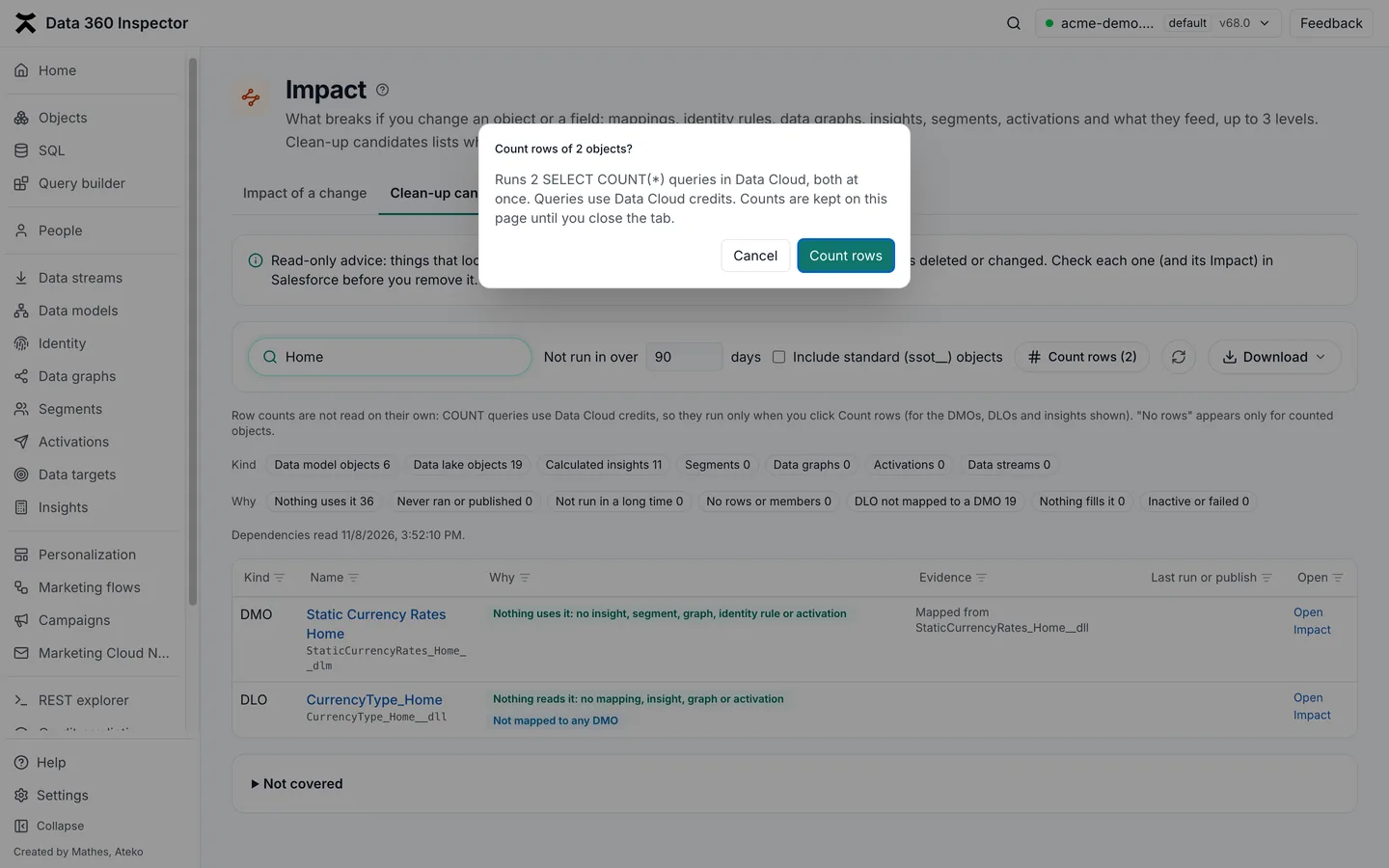
An object with no rows is a strong candidate, but counting rows means running SQL, and SQL uses Data Cloud credits. So the tab never counts on its own.
Count rows (with the number of objects shown in brackets) runs one SELECT COUNT(*) per DMO, DLO and calculated insight in the current filtered list, three at a time, after a confirmation that says how many queries it will run and how many run at once. Filter first, then count. In my demo org the full list would be 28 queries; typing Home in Find by name brought it down to 2. The counts appear as evidence ("counted" next to the number), "No rows (counted with SQL)" becomes a reason where the count is zero, and a Stop button ends the run early.
Limits
The Not covered section under the table lists what the tab cannot see:
- Data actions, data transforms, flows, Marketing Cloud Next, Agentforce and Apex are not read, so something listed as unused may still be used there.
- Personalization decision targeting is not checked, so a segment without an activation may still be used there. A segment that another segment includes counts as used.
- A DMO filled by a data transform or by identity resolution shows as "Nothing fills it" only when no mapping fills it either.
- Other data spaces are not read.
- Data graphs are checked for use only when the Personalization page is turned on in Settings > Pages (and then only against recommenders and personalization points).
Two more:
- DMOs made by Data Cloud are recognised by name and category, which I have not checked on every kind of org.
- Row counts stay in memory, never in storage, so you count again in a new session.