 Data 360 Inspector
Features · Health and governance
Impact
What breaks if you change an object or a field.
Video coming soon.
From the article What breaks in Data Cloud if I change this field? (part 25 of the series).
"Can I rename this field?" is one of the most expensive small questions in Salesforce Data Cloud. The field might feed a Data Model Object (DMO) through a data stream mapping, take part in an identity resolution match rule, sit in a calculated insight's SQL, decide who is in a segment, and go out to a data target through an activation. Data Cloud shows each of those on its own setup page, so answering the question means opening every mapping, every ruleset, every insight and every segment, and reading them one by one. Most people do not, and find out from a failed activation a week later.
Pick an object, then a field
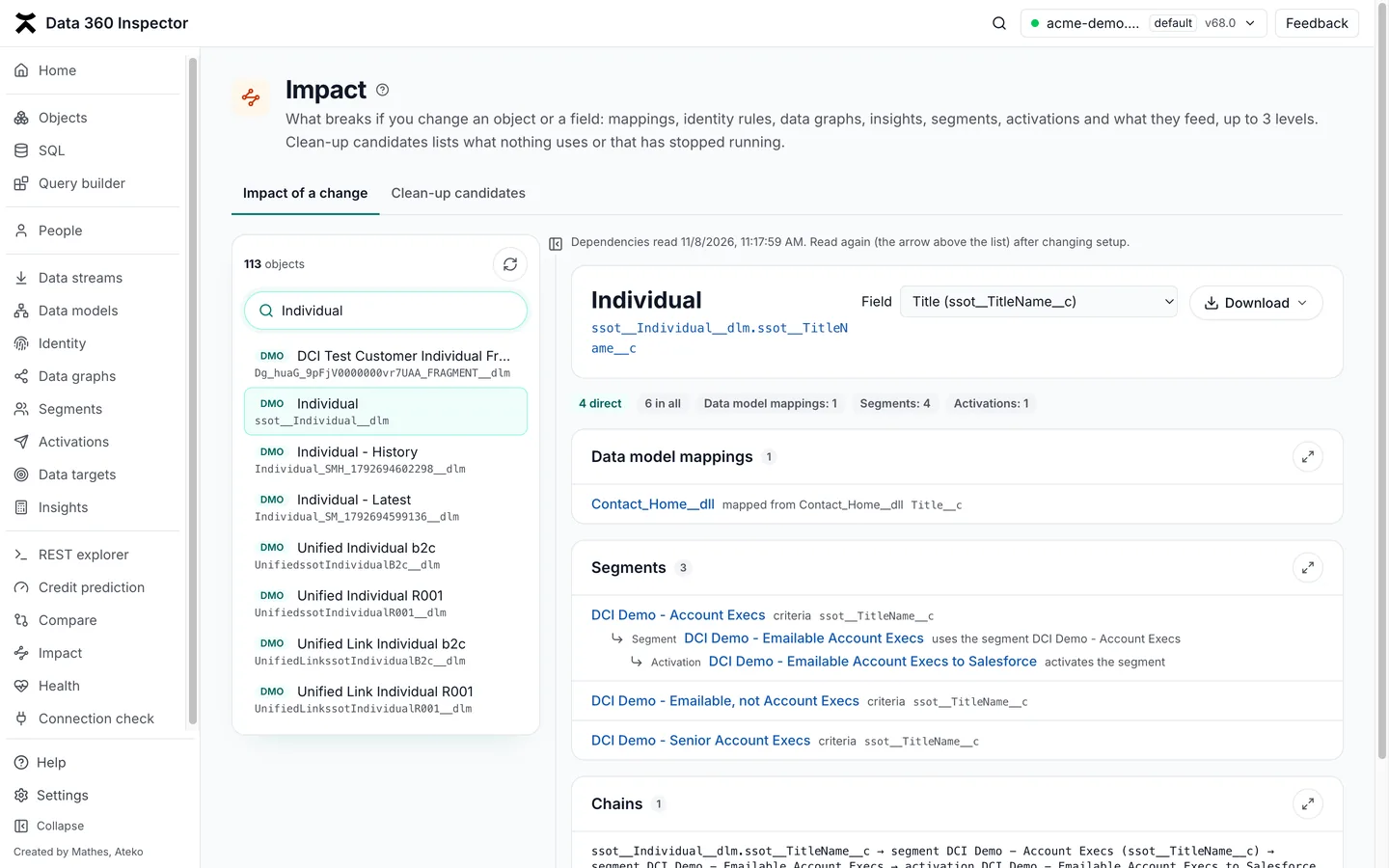
Impact sits in the sidebar next to Health and Compare. The list on the left holds every Data Lake Object (DLO), DMO and calculated insight in the data space, each with its kind badge, and a Find an object box to narrow it. In my demo org that is 113 objects.
Pick an object and the page lists what depends on the whole object. The Field menu next to the name narrows it to one field, or goes back to Whole object. You can also start from the Objects page: each object, and each field in its field list, has an Impact link.
For example, I typed Individual in the box, picked the Individual DMO, and chose Title (ssot__TitleName__c) in the Field menu. The whole object has 13 direct dependencies; the title field alone has four: the Contact_Home DLO mapping that fills it, and three segments whose criteria use it. One of those segments, DCI Demo - Account Execs, is used in turn by DCI Demo - Emailable Account Execs, and that segment is sent by an activation, so the field reaches six things in all.
The first time you open the page, it reads the dependencies in the background: data stream mappings, insights, segments and activations, identity rulesets, data graphs and then each activation's details. The progress line says which step it is on, and you can use other pages meanwhile. After that, picking another object or field makes no calls at all, because everything comes from the index it built. When you change setup in Data Cloud, the arrow above the object list reads it all again, and the page says when it last read the dependencies.
What it looks for
Each dependency comes in a card for its kind, with a line on how it uses the object or field and which fields are involved. Impact checks:
- Data model mappings in both directions: where this object's fields are mapped to, and where a DMO's fields are mapped from.
- Identity resolution: match rule criteria (named by rule), reconciliation rules and the source priority order.
- Data graphs: the object in the graph, a field in the graph, or a field used as a join.
- Calculated insights: the object or field in the insight's SQL.
- Segments: segments built on this object, and segments whose criteria use it.
- Activations: attributes, contact points and filters, with the data target each activation sends to.
- Personalization engagement signals, recommenders and personalization points, when the Personalization page is turned on in Settings > Pages.
Every name links to its own page in the extension, so from a segment row you are one click from its criteria in plain words.
Three levels deep
The direct dependencies are only half the answer. If a DLO field is mapped to a DMO field, the segments that use that DMO field also break, and so do the activations that send those segments.
Impact follows that path for up to three levels. A mapping leads to the DMO field it fills and everything that uses it, a calculated insight leads to whatever reads the insight's own object, a segment leads to its activations and to the segments that include it, and a data graph leads to the recommenders and points that read it. The indented rows under each card show the path, and the counts at the top separate direct dependencies from the total.
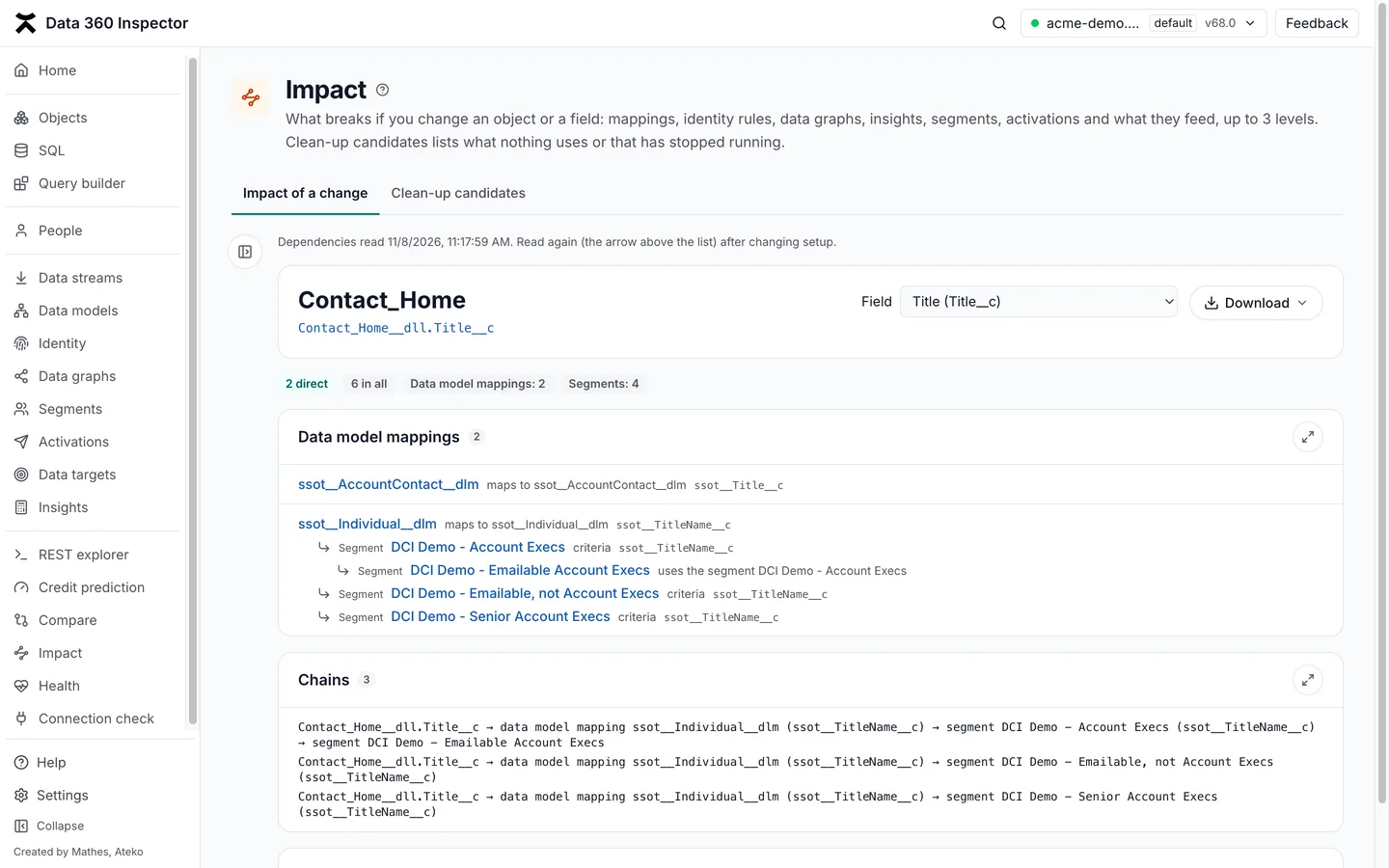
The Chains card writes each path out on one line, from the field you picked to the last thing it reaches. Starting one step earlier, from the Title__c field on the Contact_Home DLO, the demo org gives two direct dependencies and six in all, and one of the three chains reads:
Contact_Home__dll.Title__c → data model mapping ssot__Individual__dlm (ssot__TitleName__c) → segment DCI Demo - Account Execs (ssot__TitleName__c)
That one line is usually what I paste into the change request. The first chain goes one step further, into DCI Demo - Emailable Account Execs, the segment that includes Account Execs. Its activation is a fourth step away from the DLO field, past the three levels, so from here it does not show; from the Individual field above, it does.
When nothing depends on the field, the page says so: "Nothing that this page reads uses" the field, followed by a reminder to check what is not covered before changing it.
Download it
The Download menu gives the result as Markdown, Word, PDF, HTML or Excel. It holds a summary with the counts per kind, every dependency as a row (kind, name, API name or ID, how it uses it, fields, level and what it was reached through) and the list of what was not covered. That makes it a reasonable attachment for a change ticket, and the person approving the change can see exactly what was checked.
Limits
Impact can only report what it reads, and it says what it does not read under Not covered on every result:
- Data transforms, Agentforce actions, Apex and other code: nothing reads their object references.
- A data target that nothing sends to: targets show up through the activations, data actions and data shares that use them.
- Marketing flows, until you tick Include flows (each flow version is read once and kept).
- Calculated insights and segments in other data spaces, until you tick Include other data spaces.
Since I wrote this, Impact also follows identity resolution to the unified objects and what reads them, reads data actions and data shares with their targets, and looks up nested segments that are not in the segment list.
A few more things to know:
- Activation details are read for the first 200 activations. Beyond that, or when some cannot be read, the page lists it as a read problem in red under Not covered.
- The activation filter format is read on an assumption about where object and field names sit in the filter text, so a filter written in a shape I have not seen may be missed.
- The index is a picture of setup when it was read. After a deployment, read it again before trusting a "nothing uses it" answer.
The same index also feeds the Dependencies section of the pullout panel (Day 35), so the answer is there on the Salesforce page itself.