 Data 360 Inspector
Features · Data pipeline
Data streams
Lineage, schedule, record counts, problem records and field mapping.
Video coming soon.
From the article Where does this data come from, and did it arrive? One page for every data stream (part 10 of the series).
Most Data Cloud questions end at a data stream. A segment count dropped: did the stream behind it run? A field is empty on the unified profile: is it in the source at all, and which Data Lake Object (DLO) field does it land in? A new consultant asks where the loyalty data comes from: which stream, which source object, which Data Model Objects (DMOs) it feeds? In Data Cloud each of those answers sits on its own page, one stream or one mapping at a time.
For the last four days I looked at people: one person, how they were matched and merged, and a whole list at once. Today moves upstream, to where those people come from.
Every stream in one table
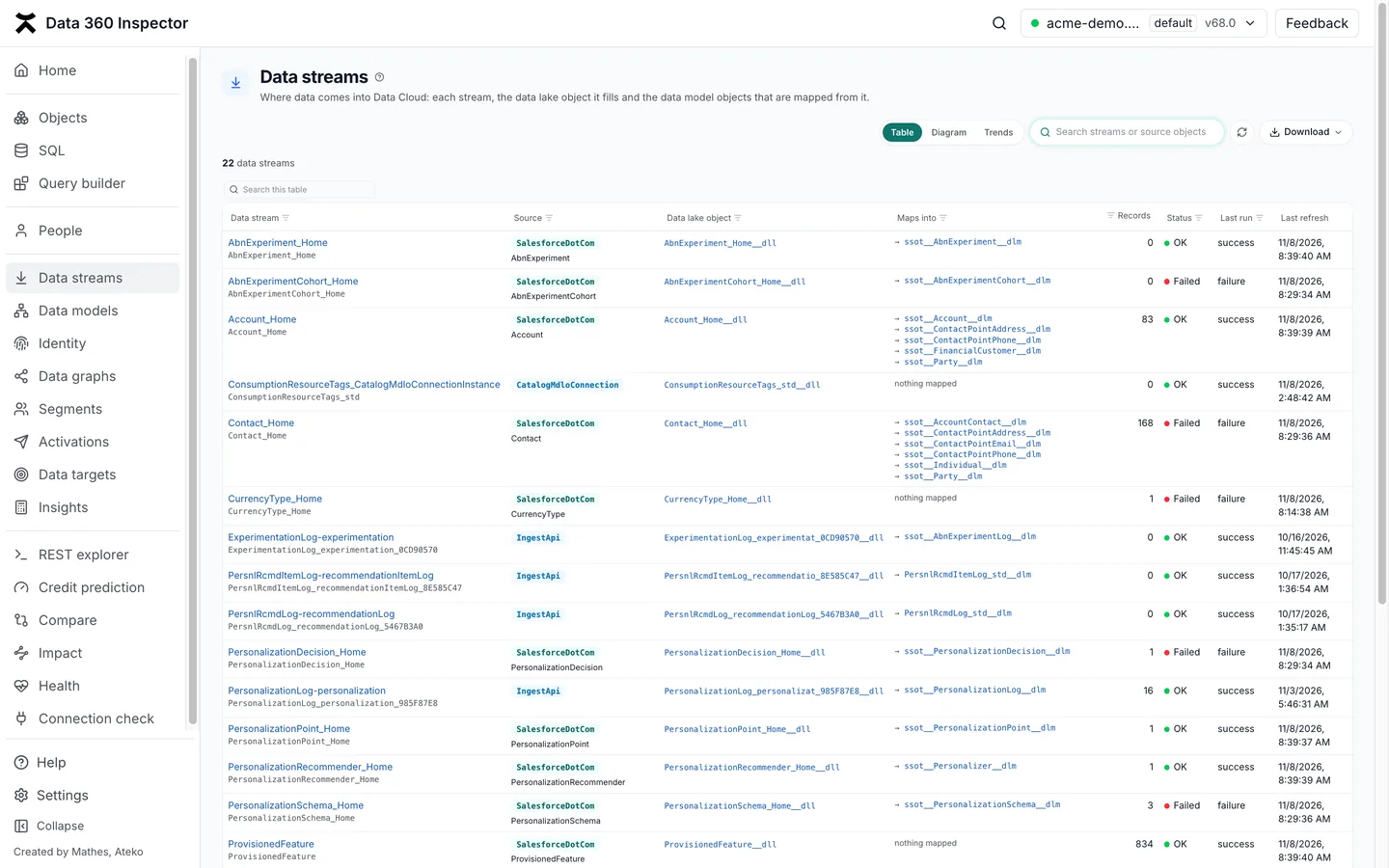
Data streams opens with a table of every stream in the selected data space:
- Data stream, with its label and API name.
- Source: the connector type and the source object.
- Data lake object: the DLO the stream fills, linked to Objects.
- Maps into: the DMOs that DLO is mapped to, or "nothing mapped".
- Records: the total the stream reports.
- Status: OK, Failed, Needs a look, Running or Inactive, with the reason on hover.
- Last run, as the status of the last run, and Last refresh, as its date and time.
Like every table in the Inspector, each column sorts and filters, and the search box finds streams by label, API name or source object. The Download menu exports the table as you see it, after filters and sorting, as Markdown, Word, PDF, HTML or Excel.
Status is read from the stream record. A stream that is not active is Inactive; one whose last run failed is Failed; one that has never run needs a look. Zero copy streams (BigQuery, Snowflake, Databricks, Redshift) are queried live from the source and never "run", so without an acceleration schedule they count as OK instead of being flagged forever.
In my demo org the table shows 22 data streams, 6 of them with nothing mapped. Five are Failed, all of them Salesforce CRM streams whose last run failed that morning, Contact_Home among them with 168 records. The six with nothing mapped are mostly the Digital Wallet consumption streams, which land in DLOs that nothing in the data model reads.
Lineage as a diagram
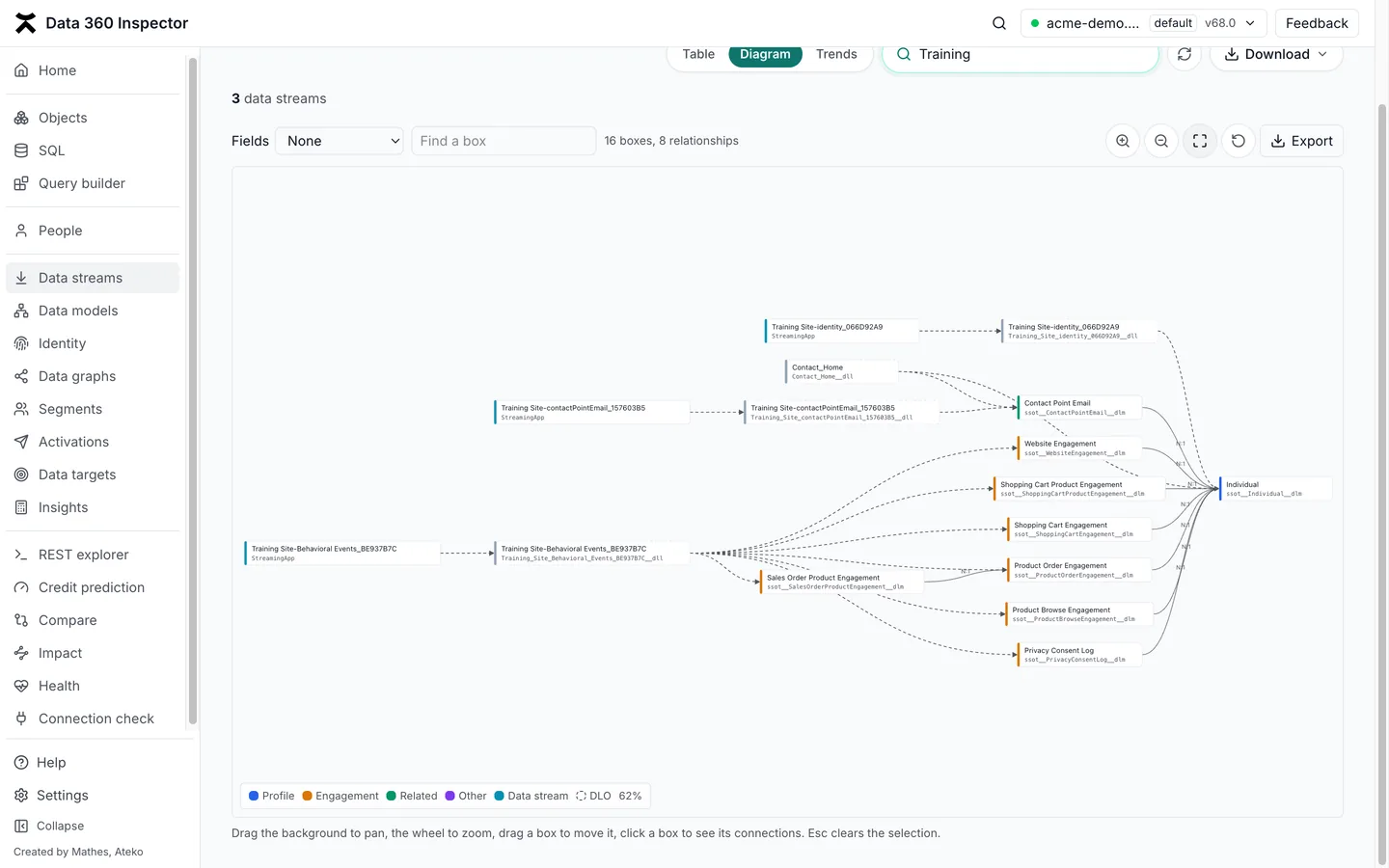
The Diagram button draws the same streams as lineage: each stream feeds its DLO, and each DLO points to the DMOs it is mapped into. It is the Data models diagram (Day 12) with the streams added in front, so it pans, zooms and exports the same way. It draws whatever the table shows, so filtering the table to one source first gives a smaller, readable picture. For the image I searched for "Training", which leaves the three streams of the demo org's training website. A DLO from another stream that maps into the same DMO is drawn too, which is why Contact_Home__dll sits next to Contact Point Email.
The third button, Trends, is tomorrow's topic.
One stream
Click a stream and its page opens, with the list of streams on the left for moving between them. The details at the top answer the "did it run?" questions in one block:
- Source, with the connector name.
- Status, and whether the stream is disabled.
- Last run: its status and time, or "never run".
- Schedule in words, for example "batch, at times Data Cloud sets, upsert mode" for a Salesforce CRM stream, "streaming, as events arrive" for a Web or Mobile SDK stream, or "when data is sent through the Ingestion API".
- Records: the total, and how many the last run added and processed.
- Type and access mode, and whether it is accelerated.
- Data lake object, with Create SQL, which opens a SELECT of the DLO's fields in a SQL tab.
- Problem records: how many and the latest, with Open in SQL, or "none configured" when the stream has no problem record DLO, as Salesforce CRM streams in my demo org do not.
Open in Salesforce opens the stream's record in Setup, and the Download menu exports the whole page.
Problem records
Rows a stream could not ingest go to its problem record DLO, which is easy to forget because nothing on the stream itself says how full it is. The stream page counts them with one query when it opens, and Open in SQL runs the latest 100 with their timestamp, error code, detailed error, the fields involved and the row itself. A stream that reports a successful last run while its problem records keep growing is one of the quieter ways data goes missing, and this is the quickest way I know to see it.
Where each field lands
Below the details, Maps into lists every DMO the stream's DLO is mapped to, with the number of mapped fields and Create SQL for each. Then Source fields lists every field the source sends, with its type and the DLO field it lands in. The search box above the table finds a field by either name.
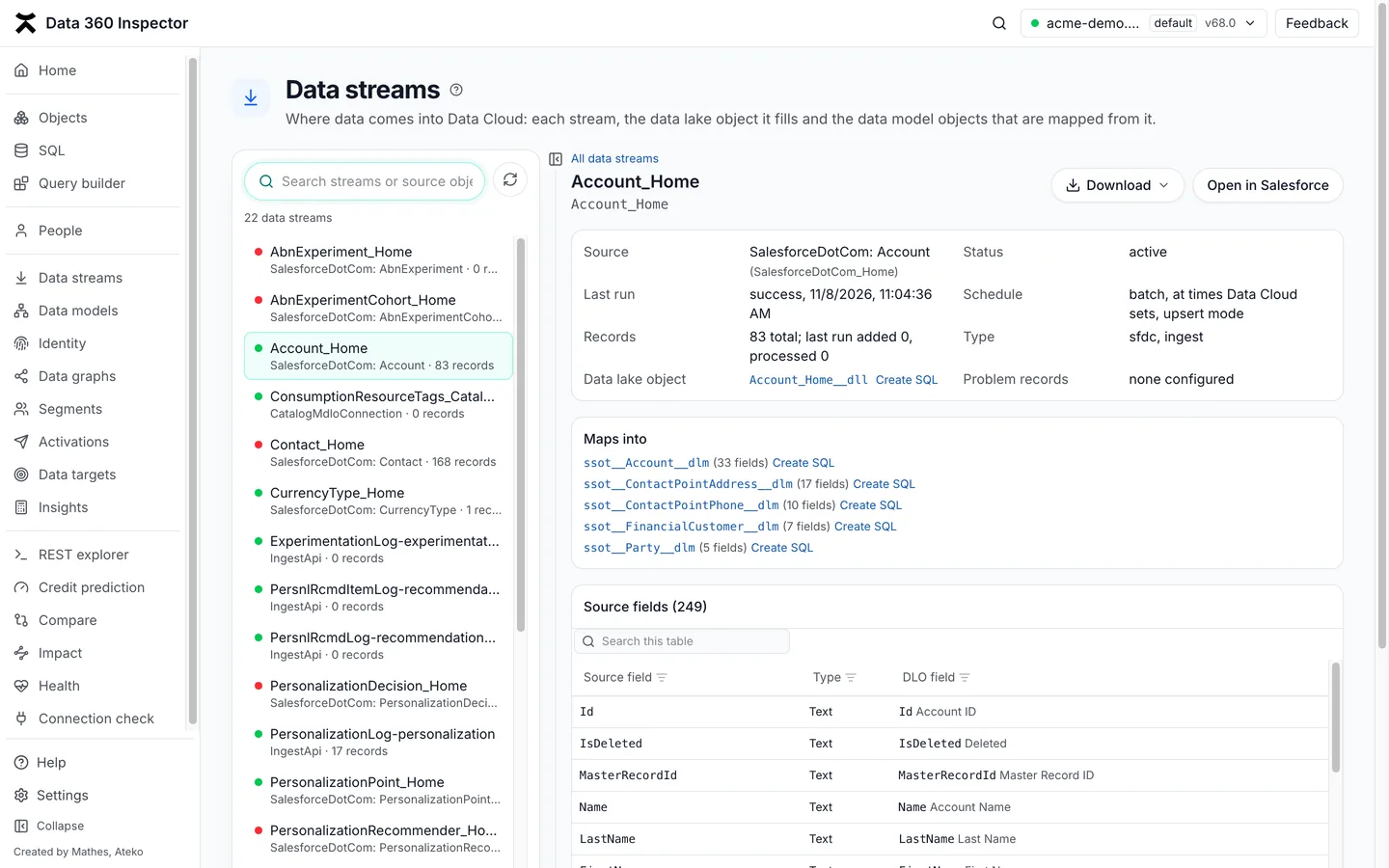
This is the table I use when someone says "the field is in the CSV, why is it empty in Data Cloud?". A source field with no DLO field next to it is the first suspect.
How it reads the org
The list comes from the data streams endpoint, read once and kept with the other org details in this browser (Settings > Storage > Keep org details, a day by default). The refresh button next to the search box reads it again. Maps into needs the mappings of every DMO, one call per DMO, a few at a time, so on a large org the first visit shows "Reading mappings" with a count for a while. After that they are kept like the rest.
Limits
A few things to know:
- The stream record only knows its last run. For runs over time, see tomorrow's Trends.
- The DLO field next to each source field is matched by name, not read from a mapping: the same name, the name with __c, dots turned into underscores (cartItem.cartEventId lands in cartItem_cartEventId), and long names Data Cloud cut short with a hash. A renamed field still shows no DLO field here even when it does land somewhere.
- Status follows the stream record. A stream that ran successfully but brought fewer rows than usual is OK here; Trends flags that.
- Problem records are counted when you open the stream, with a Data Cloud SQL query.
- Schedule words come from the stream's frequency type, or from the connector when the stream has no frequency; an unusual value is shown as Data Cloud gives it, in lower case.