 Data 360 Inspector
Features · People and identity
How they were merged
The merge graph, and why each pair of records matched.
Video coming soon.
From the article How did identity resolution build this profile? Draw it (part 8 of the series).
A unified profile with two source records is easy to reason about. One with seven is not. When someone asks why a CRM contact, two web sign-ups and a loyalty member all became one person, the honest answer is a chain: this record matched that one on email, that one matched a third on phone, and the third matched the rest on name and address. Data Cloud does not store that chain. It stores a link from each source record to the unified profile, and nothing about which rule joined which pair.
One profile as a graph
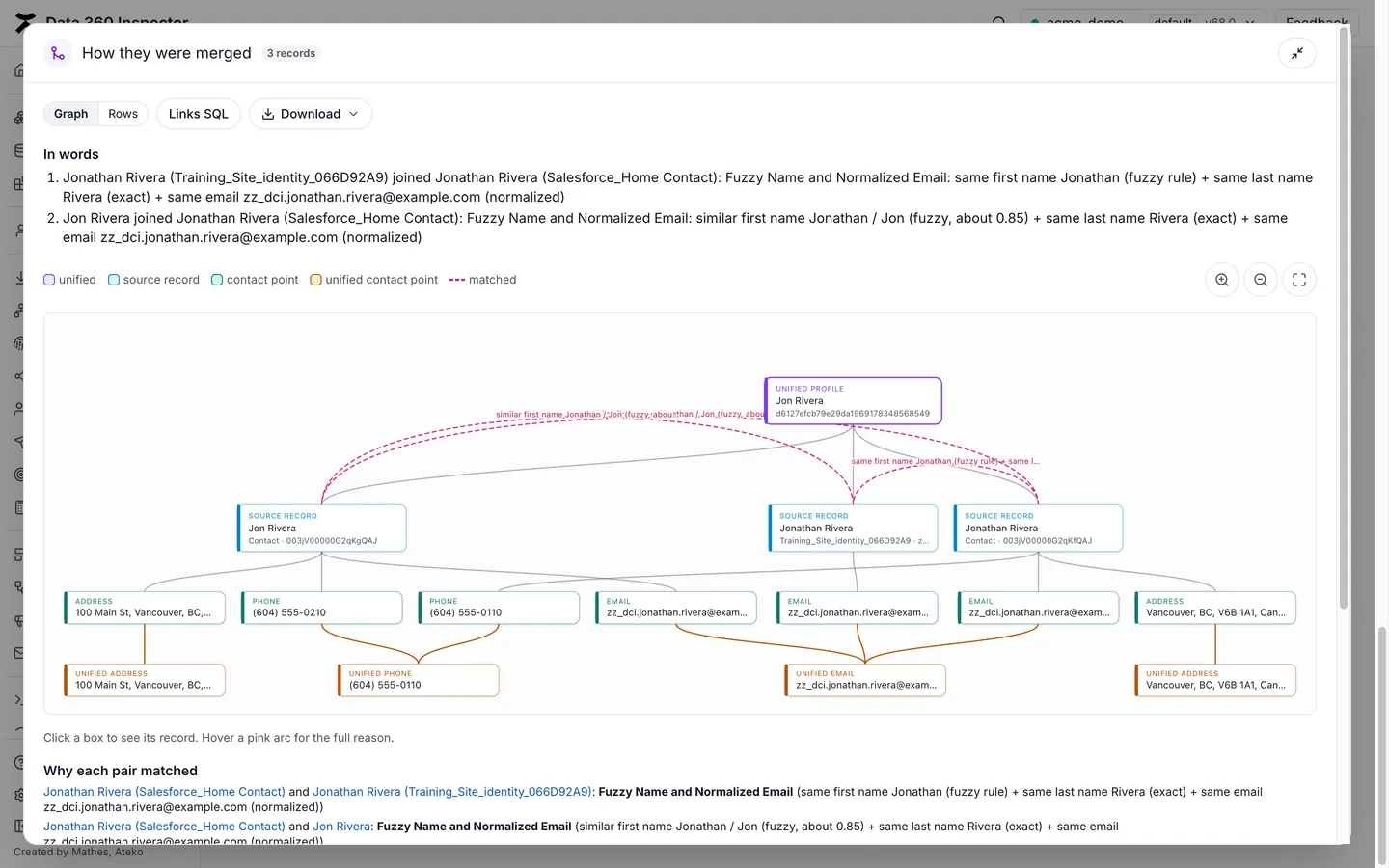
How they were merged sits on a person's page on People, below the engagement timeline. The Graph view draws the profile from top to bottom:
- The unified profile at the top.
- Its source records, each with the source object or data source it came from and its record ID.
- Each source record's contact points: emails, phones, addresses and party identifiers.
- The unified contact points, connected to the source contact points that fed them.
Between the source records, pink dashed arcs show the pairs that match, each labelled with the reason. Hover an arc to read the full reason, and click any box to open that record with all its fields in a side panel.
The graph is drawn at its natural size and shrunk to fit the box when it is wider, so a profile of two records no longer fills the screen with two giant boxes. Zoom in, Zoom out and Fit sit above it, next to a legend: unified, source record, contact point, unified contact point and matched. The graph is fitted again when the box changes size, so it fits on the page, after Maximize and after Restore. The maximize button at the top right of the section gives the graph the whole window, which is how I took the picture above. A contact point row with no value is left out of the graph, so an empty address does not show up as a box.
When no ruleset is picked, or the person is not in a unified profile of the chosen ruleset, the graph still draws the source record and its contact points, with a line saying why nothing is merged.
The reasons, in words
Above the graph, In words tells the same story as a numbered list. It starts from the first source record and walks outwards, one join at a time, such as "Jon Rivera joined Jonathan Rivera (Salesforce_Home Contact): Fuzzy Name and Normalized Email: similar first name Jonathan / Jon (fuzzy, about 0.85) + same last name Rivera (exact) + same email zz_dci.jonathan.rivera@example.com (normalized)".
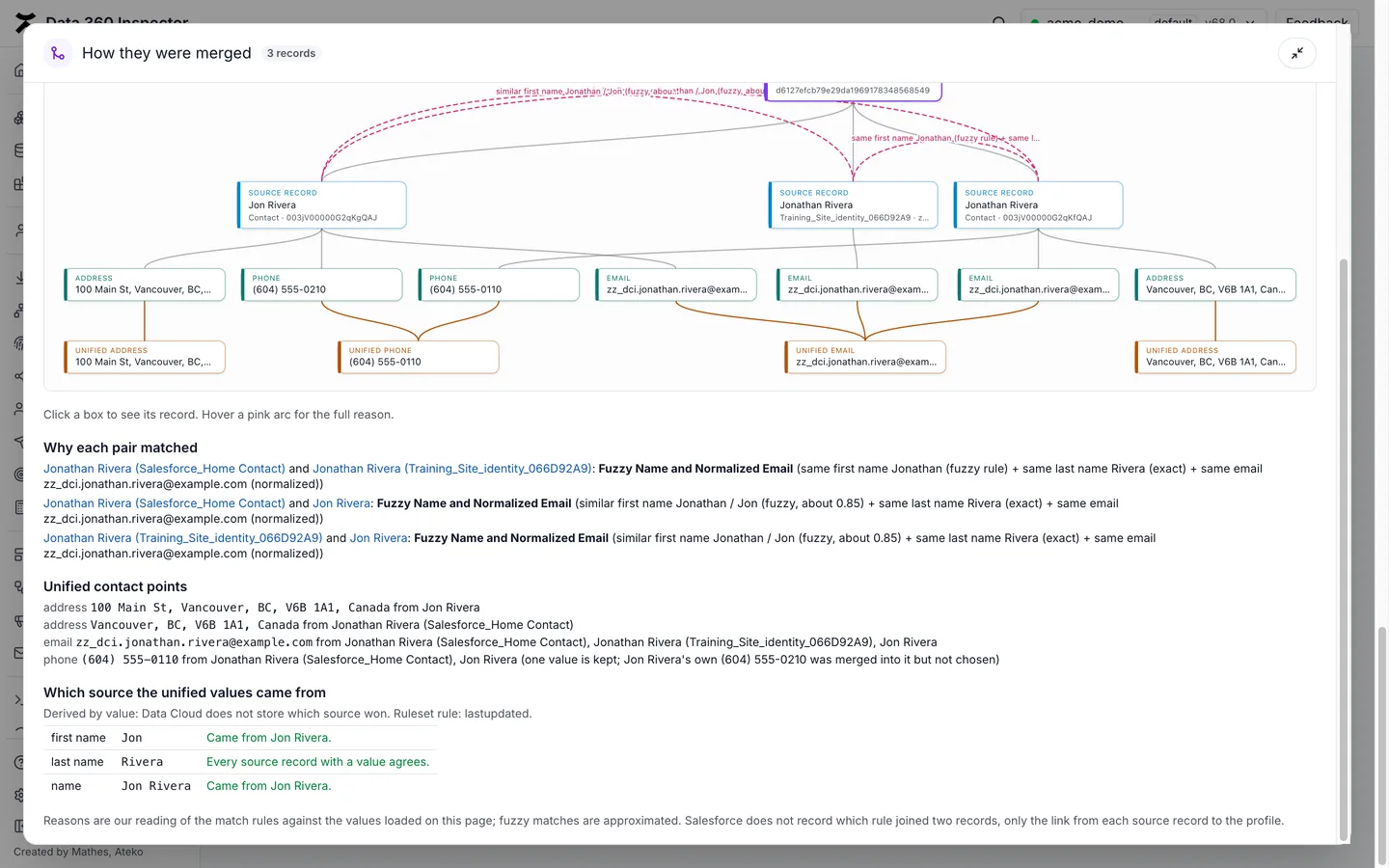
Below the graph, Why each pair matched lists every pair the check can explain, with the rule's label and the shared values behind each criterion. For a fuzzy criterion it shows both values and a similarity score, as in "similar first name Jonathan / Jon (fuzzy, about 0.85)"; when the values are the same it says "same first name Jonathan (fuzzy rule)". When two source records have the same name, as two of Jon Rivera's do, each name carries its data source, such as "Jonathan Rivera (Salesforce_Home Contact)" and "Jonathan Rivera (Training_Site_identity_066D92A9)", so the pairs can be told apart. When both records' link rows carry the same match keys, that is listed too, because those come from Salesforce rather than from my reading of the rules.
The reasons use the same check as yesterday's match rules card, including the approximated fuzzy match.
Chains, and pairs the check cannot explain
The part I find most useful is the chains. When two records share nothing directly, the section says so: "A and B share nothing directly; they are together through C (identity resolution is transitive)." That one sentence usually answers the "why are these two people one profile?" question, because the record in the middle is the one to look at.
Sometimes the check cannot connect everyone. Then the section says how it splits the records, and why Salesforce may still have joined them: a fuzzy match looser than the approximation, or a record outside this profile, or one not loaded, that linked them. I keep that wording deliberately cautious, since the page is reconstructing a decision Salesforce does not record.
Where the unified values came from
Two more blocks explain the unified record itself.
Unified contact points lists each unified email, phone or address and the source records whose contact points fed it. On Jon Rivera, the unified email came from all three source records, the address in Vancouver from one Jonathan Rivera, and 100 Main St from Jon Rivera alone. When the sources held different values, the line says which values were merged into the unified one but not chosen; on Jon Rivera, his own phone (604) 555-0210 was merged into the unified phone (604) 555-0110. Each line only counts contact points of its own kind, even where Salesforce gives a person's unified email, phone and address the same record ID, as it does on my demo org. That comes from the ruleset's link objects for contact points, read with one query per object.
Which source the unified values came from takes the name fields, and any fields in the ruleset's reconciliation rules, and compares the unified value with each source record. Each field gets one of these notes:
- Came from one named source record, when only one holds that value.
- Every source record with a value agrees.
- Several source records hold this value, and which one won is not recorded.
- No loaded source record has this value, which happens when the value was normalized.
- Blank on the unified record.
Data Cloud does not store which source won a reconciliation, so this is worked out by value, and the page says so, together with the ruleset's reconciliation rule (in my org, "lastupdated").
Possible over-merges
A profile with more than 50 source records gets a warning at the top of the section. Profiles that large usually come from a shared value: a test email, a company phone number or a placeholder. The warning lists the values most of the records share, with how many records have each one, so the culprit is often the first line. The Identity page lists the largest unified profiles of each ruleset with a How merged link that opens this section directly; Merge health on that page is Day 15.
Rows, SQL and downloads
The Rows view shows the same information as a table with From, Relation, To and Detail, for profiles too big to read as a picture. Links SQL opens the profile's link records in a SQL tab. The Download menu exports the summary, source records, why they matched, the chains, contact points, unified contact points, reconciliation and the most shared values as Markdown, Word, PDF, HTML or Excel. When I hand a merge question to a client's data team, I send that file rather than a screenshot.
In my developer org, the largest profiles have three source records, and Jon Rivera is one of them: every pair of his records matches directly on the same rule, so the graph has no chain to explain. The interesting part there is the fuzzy first name, Jonathan against Jon, which my check scores right at the 0.85 threshold.
Limits
A few things to know:
- Salesforce records which profile each source record belongs to, not which rule joined which pair. Every reason here is my reading of the rules against the values on the page, and fuzzy matches are approximated.
- A profile is read with up to 200 source records, and up to 50 chains are listed.
- Contact points are read up to 100 rows per object, so a source record with more than that may be missing values in the reasons.
- Unified contact point links and party identification numbers are read with object and field names I have not yet seen on an org with that data. If they differ, those blocks say "no link records found" or show the error.
- The reconciliation block compares values. When two sources hold the same value, it cannot say which one won.