 Data 360 Inspector
Features · People and identity
Match rules and missed matches
The match rules next to the person's values, and people who probably should have merged.
Video coming soon.
From the article Why did identity resolution join these records, and leave that one out? (part 7 of the series).
Two identity questions come up on almost every Data Cloud project, and they usually arrive together. Why are these two source records one unified profile? And why is that third record, with the same email address, not in it? Data Cloud has the pieces of the answer, but in three places. Setup shows the ruleset's match rules, the link object says which source record went into which unified profile, and the values the rules compare sit in the contact point objects. Putting them side by side by hand takes a few SQL queries and a spreadsheet.
Start with the ruleset
A person is unified per identity resolution ruleset, so the search on People has a Ruleset picker beside the search box. Each option shows the ruleset's label, its ID and how its last run went. The page remembers the ruleset you picked for each org. A View all details link from another page (an Individual ID in SQL results, for example) opens the person with the ruleset that unified them.
Everything below follows that choice. Switch the ruleset and the same person opens again under the other one, with that ruleset's rules.
The match rules, with the values
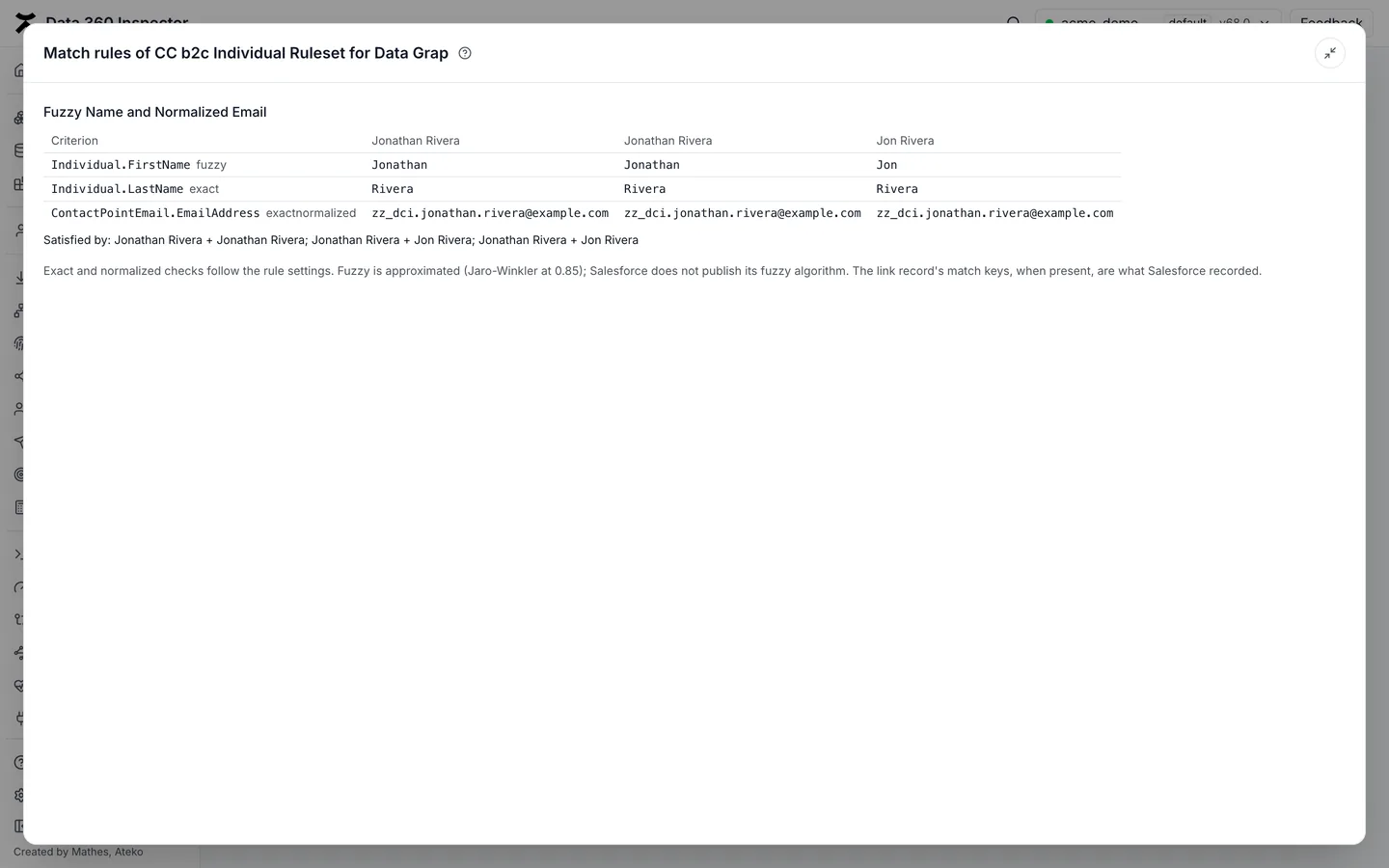
Further down a person's page there is a card called "Match rules of" followed by the ruleset's name. It lists every match rule of the ruleset, and each rule is a small table:
- One row per criterion, with the object and field it compares, such as ContactPointEmail.EmailAddress or Individual.FirstName, and the match method (exact, exactnormalized or fuzzy).
- One column per source record in the profile, headed with the record's name.
- In each cell, the values that record has for that field, or "blank" when it has none.
Under each table, a line says which pairs of records satisfy every criterion of that rule, for example "Satisfied by: Jonathan Rivera + Jon Rivera".
In my developer org, Jon Rivera is one unified profile of three source records: two Contacts from Salesforce and one record from a website identity stream. The fuzzy first name row is the interesting one: Jonathan and Jon score about 0.85, right on the threshold, and the card counts it as a match.
The check runs in the browser, on values the page has already loaded for the person, so it adds no queries. The values come from two places:
- The source Individual record, for criteria on the Individual object.
- The objects related to the source Individual by its ID, such as email, phone and address contact points, for criteria on those objects.
Each criterion is compared the way the rule describes it. Exact compares the values as they are, ignoring case unless the criterion is case sensitive. Exact normalized lowercases the values, keeps only the digits of a phone number and collapses spaces. Fuzzy is an approximation: the Inspector uses Jaro-Winkler similarity with a threshold of 0.85, because Salesforce does not publish its fuzzy algorithm. A criterion set to match on blank values counts two blanks as a match.
The source record cards above the rules also show each record's match keys when the link record has them. That field is what Salesforce itself recorded, so it is the one piece of evidence on the page that is not my reading of the rules.
When no pair matches
Sometimes a rule's table says no pair satisfies every criterion. The card then says: "No pair of these records satisfies every criterion by our check; they may have been joined through another record or rule (identity resolution is transitive)."
That second part matters more than it looks. If record A matches record B on email and B matches C on phone, A and C end up in one profile even though they share nothing. The rule tables show each pair on its own, so a chain like that is easy to miss here.
Possible missed matches
The second card answers the other half of the question. It takes every email address of the profile's source records and looks for other Individuals with the same address, ignoring case, that are not in this profile. Each one is listed with its name and the shared address, as in "Priya Raman also has priya.raman@example.com".
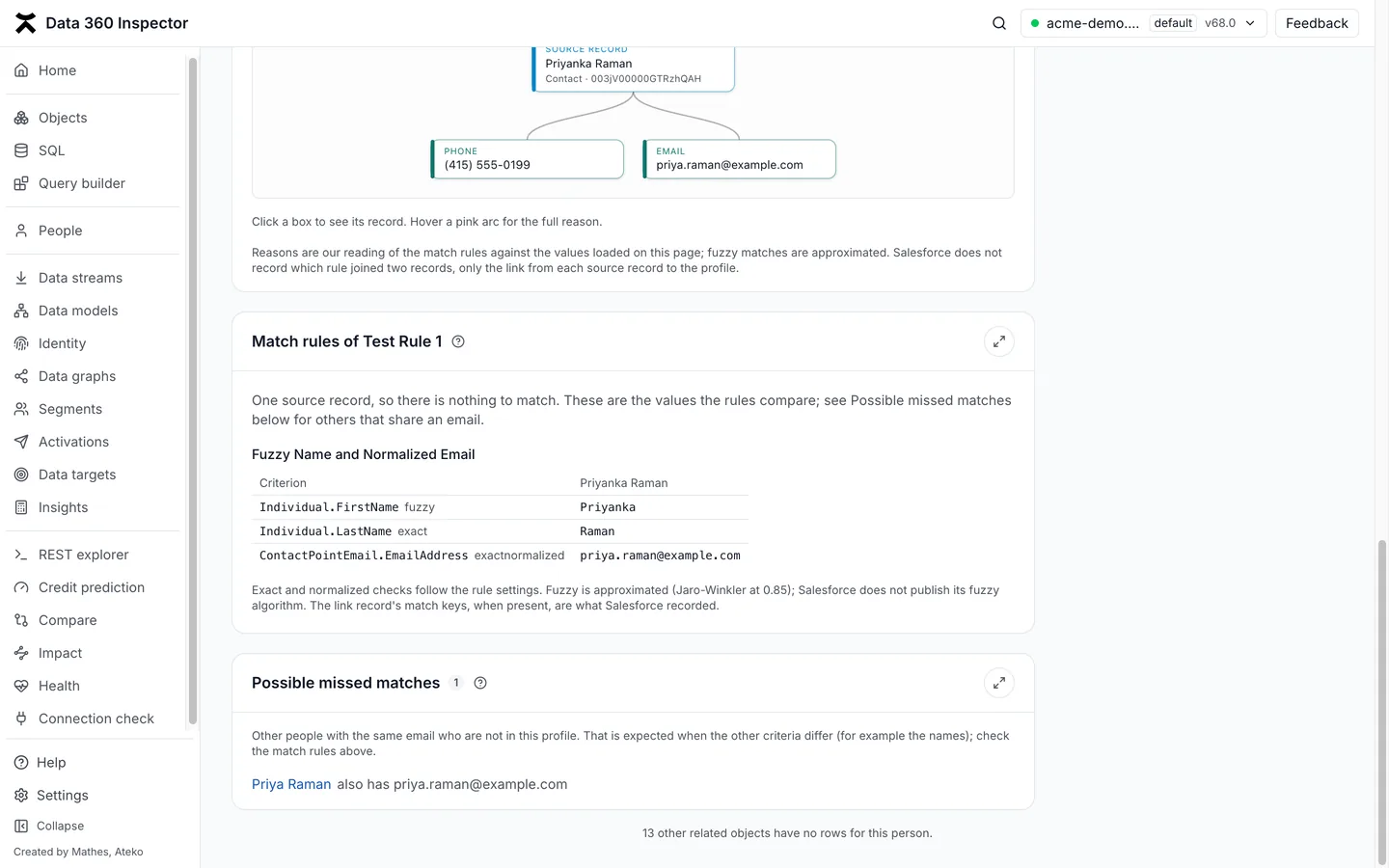
The card only appears when it finds someone. Its note is honest about what a hit means: "That is expected when the other criteria differ (for example the names); check the match rules above." A shared email is often a household or a shared inbox, and a ruleset that requires email and name together is right to keep those apart.
Click a name and that record opens on People, under the same ruleset. From there I compare its values with the rule table of the first person. In my experience the reason is usually one of these:
- A name that the fuzzy criterion does not accept, such as a nickname or a typo in the first letters.
- A criterion on a field the other record does not have, which shows as blank in its column.
- The ruleset has not run since the other record arrived; the Ruleset picker shows how its last run went.
In my developer org, the card on Priyanka Raman found Priya Raman, a separate Contact with the same priya.raman@example.com. Both are "not unified" under each ruleset, although the last name and the email are the same and my approximated fuzzy check accepts Priya and Priyanka. So either the ruleset had not run since the two records arrived, or Salesforce's fuzzy match is stricter than the approximation; the next run of the ruleset tells which.
Taking it with you
The Download menu at the top of the person card exports the profile as Markdown, Word, PDF or HTML. The export includes each match rule with every source record's values and the pairs that satisfy it, which is the part I paste into a ticket when I ask someone to change a rule. Both cards can also be maximized to fill the window, which helps when a profile has many source records and the table gets wide.
Limits
A few things to know:
- The pairs are my reading of the rules against the loaded values, not a record of what Salesforce did. Fuzzy matching in particular is approximated, so a pair Salesforce joined may show no match here, and the reverse.
- Exact normalized is approximated too: lowercase, digits only for phone fields and single spaces. Salesforce may normalize more, for example country codes.
- Values come from the source Individual and objects related to it by its ID, up to 100 rows per object. A criterion on an object the page does not read shows blank.
- A profile is read with up to 200 source records.
- Possible missed matches looks at email addresses only, up to 50 people. Shared phone numbers are not checked here.
- With one source record there is nothing to pair; the card says so and still shows the values the rules compare.
- Nothing here changes a ruleset. To see what a rule would do with records you pick, Identity has Compare people, which is Day 14.